Jump to content
View in the app

A better way to browse. Learn more.

GGames Fórum

A full-screen app on your home screen with push notifications, badges and more.

To install this app on iOS and iPadOS
  1. Tap the Share icon in Safari
  2. Scroll the menu and tap Add to Home Screen.
  3. Tap Add in the top-right corner.
To install this app on Android
  1. Tap the 3-dot menu (⋮) in the top-right corner of the browser.
  2. Tap Add to Home screen or Install app.
  3. Confirm by tapping Install.

Como renomear usuário de banco de dados do CPANEL

Eu já disse que organização é tudo?
https://g.ggames.com.br/tutorials/article/538-como-renomear-usuario-de-banco-de-dados-do-cpanel/

Nesse tutorial irei explicar como renomear usuários existentes em seu painel CPANEL, também dou detalhes de como editar o usuário nesse artigo.


1. Acesse o CPANEL da sua HOSPEDAGEM.

2. Vá em MYSQL.
image.png

3. Localize o usuário desejado, na coluna AÇÕES clique em EDITAR ou RENAME.
image.png

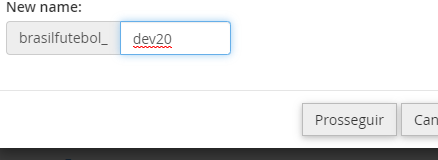
4. Digite o nome de usuário desejado.

image.png

Caso esse banco esteja em uso, é importante atualizar também o arquivo de conexão da aplicação, no meu caso foi o Wordpress, então editei o wp_config


https://g.ggames.com.br/tutorials/article/538-como-renomear-usuario-de-banco-de-dados-do-cpanel/

User Feedback

Recommended Comments

Create an account or sign in to comment

Configure browser push notifications

Chrome (Android)
  1. Tap the lock icon next to the address bar.
  2. Tap Permissions → Notifications.
  3. Adjust your preference.
Chrome (Desktop)
  1. Click the padlock icon in the address bar.
  2. Select Site settings.
  3. Find Notifications and adjust your preference.