


A pedidos do meu amigo @ryzen, irei explicar como traduzir os links absolutos do seu fórum IPS. O bacana de traduzi-los é que dará um ar de 'coisa bem feita'.
Mas exatamente o que será feito? Ele vai pegar o link https://ggames.com.br/topic/ e transforma-lo em https://ggames.com.br/topico/, outro exemplo é mudar de https://ggames.com.br/search para https://ggames.com.br/busca
Eu tive o maior trabalho para traduzir tudo, mas valeu a pena, vamos ao tutorial.
1. Acesse seu painel administrativo e faça login.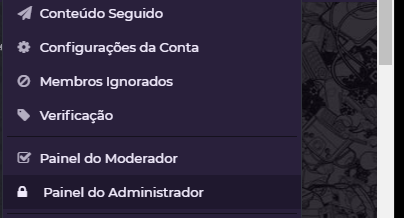
2. Procure SEO e clique na opção Customize Friendly URLs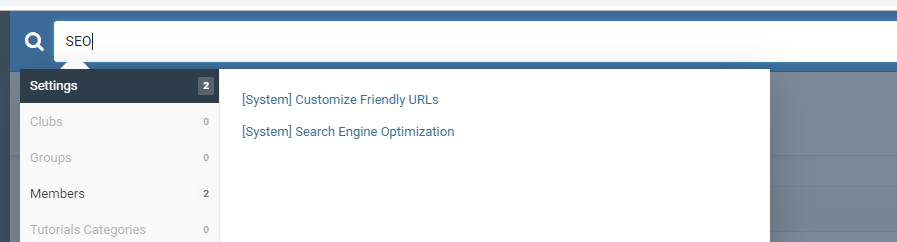
3. Ele vai exibir todas as opções disponíveis. Basta clicar no LAPIS editar como desejar.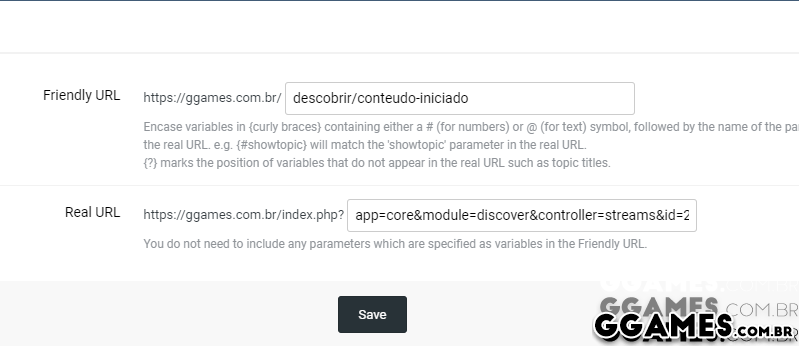
Após isso ser feito, é só salvar as configurações.
Infelizmente não é possível traduzir algumas informações, como por exemplo o link absoluto do IP.DOWNLOAD ou TUTORIALS. Porém a grande maioria (95%) dá para editar.
Comentários Recomendados
Crie uma conta ou entre para comentar