




.gif.1ecb77ab2004a6ea875a6cabe4f38887.gif)

403 - Forbiddeen
Fundador
-
Registro em
-
Última visita
Tudo que 403 - Forbiddeen postou
-

-
 Por ser o mensageiro mais popular da atualidade, o WhatsApp dispensa apresentações. Se você está nessa página a fim de baixá-lo, certamente é porque já conhece e usa o software em seu smartphone. A novidade, entretanto, é que, agora, você pode conversar com seus amigos e familiares utilizando um programa nativo para o Windows na sua Área de trabalho. Até então, se você quisesse utilizar o mensageiro no PC, era preciso acessar o WhatsApp Web através do navegador. Isso, entretanto, não pode ser considerado uma solução definitiva para muita gente que não tem um PC muito potente e não quer ter que manter mais uma guia do Chrome ou de outro browser continuamente aberta. Falando nisso, o WhatsApp Web é conhecido por fazer o Google Chrome travar. Mesmo em dispositivos mais robustos, já vimos o poder destrutivo dessa aplicação online, que consegue derrubar o navegador da Google de seu pedestal sempre que deseja. Se você usa o Windows 8, use a versão 32bits, já quem usa Windows 10, use a versão 64bits.
 -
Visulizar Arquivo Whatsapp Web para Windows Atualizado Por ser o mensageiro mais popular da atualidade, o WhatsApp dispensa apresentações. Se você está nessa página a fim de baixá-lo, certamente é porque já conhece e usa o software em seu smartphone. A novidade, entretanto, é que, agora, você pode conversar com seus amigos e familiares utilizando um programa nativo para o Windows na sua Área de trabalho. Até então, se você quisesse utilizar o mensageiro no PC, era preciso acessar o WhatsApp Web através do navegador. Isso, entretanto, não pode ser considerado uma solução definitiva para muita gente que não tem um PC muito potente e não quer ter que manter mais uma guia do Chrome ou de outro browser continuamente aberta. Falando nisso, o WhatsApp Web é conhecido por fazer o Google Chrome travar. Mesmo em dispositivos mais robustos, já vimos o poder destrutivo dessa aplicação online, que consegue derrubar o navegador da Google de seu pedestal sempre que deseja. Se você usa o Windows 8, use a versão 32bits, já quem usa Windows 10, use a versão 64bits. Autor 403 - Forbiddeen Enviado 20-04-2019 Categoria Utilitários
-
 Note: Offline mode only. Download : Save Game World War Z (All Upgrades, work ONLINE) OPTIONS Num 1 – Infinite Health Num 2 – Infinite Ammo Num 3 – No Reload Num 4 – Super Speed Num 5 – Slow Motion Num 6 – Add 10,000 Money (Enter your player Nickname for it to work) Num 0 – Easy Kill NOTES This trainer only work for offline mode. “Infinite Ammo” takes effect when reloading ammo. “Add 10,000 Money” takes effect when you open different menus. “Add 10,000 Money” requires matching your player nickname for it to work.
 -
 Trainer options Numpad 1 - Infinite Health Numpad 2 - Infinite Ammo / Throwables Numpad 3 - No Reload Numpad 4 - Items Won't Decrease Numpad 5 - Infinite Experience Numpad 6 - Infinite Skill Points Numpad 7 - Super Speed Numpad 8 - Slow Motion Numpad 0 - One Hit Kill F1/F2/F3/F4 - 2/4/8/16x Experience Home - Disable All
 -
 Trainer options: Numpad 1 - Infinite Health Numpad 2 - Max Ability Gauge Numpad 3 - Max Awaken Gauge Numpad 4 - Max Mobility Gauge Numpad 5 - Teammates No Cooldown Numpad 6 - Freeze Timer Numpad 7 - Empty Opponent's Ability Gauge Numpad 8 - Empty Opponent's Awaken Gauge Numpad 9 - Empty Opponent's Mobility Gauge Numpad 0 - One Hit Kill Numpad (.) - One Hit Shred Clothes Numpad (+) - Super Speed Numpad (-) - Slow Motion Ctrl + Numpad 1 - Infinite Money Ctrl + Numpad 2- Infinite Experience Ctrl + Numpad 3 - Infinite SP Ctrl + Numpad 4 - Infinite Items F1/F2/F3/F4 - 2/4/8/16x Experience Home - Disable All Note: These instructions are for legit game copy, you may ignore this if you have cracked copy. This game uses EasyAntiCheat protection, in order to launch this game without EAC, please follow these instructions: 1. Start steam in offline mode. 2. Copy "JUMP_FORCE.exe" to game directory. 3. Start game.
 -
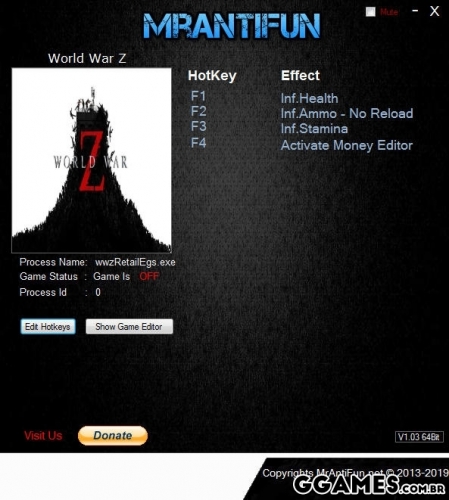 Options: F1 - Inf.Health F2 - Inf.Ammo - No Reload F3 - Inf.Stamina Notice: Reload Cheat doesn't effect heavy weapons however Ammo cheat should work fine if you have ammo to reload .
 -
 Options: F1 - Inf.Resources F2 - Inf.Units F3 - Inf.Health Notice: First select the ship then activate Resources / Units cheats First build 1 unit then activate health cheat, Dispose of the unit and build more units "If you don't do this you will have a visual bug of health bar "
 -
 Options: F1 - Inf.Money F2 - Inf.Weed F3 - Super Weed Quality F4 - Super Plant Quality F5 - Instant Growth F6 - No Police Temp Vigilance F7 - Inf.Research Points Notice: First get into the game and speed up the time a bit then activate Money Cheat First you must have any kind of Weed in your quick slot then activate Inf.Weed Cheat First you must have any kind of Weed in your quick slot then activate Super Weed Quality and it will set all the Weed you have to Legendary First plant any kind of weed seed then activate Super Plant Quality/ Instant Growth /No Police Temp Vigilance First spend 1 Research Points then activate Inf.Research Points cheat.
 -
 Trainer options: F1 - Infinite Health F2 - Infinite Stamina F3 - Infinite Ammo / Infinite Gadget F4 - No Reload F5 - Infinite Money F6 - No Recoil F7 - Infinite Perks F8 - Easy Crafting Notice: You can't use the trainer without using EAC bypass which was made by "SunBeam". Link to it http://fearlessrevolution.com/viewtopic.php?f=4&t=6334, the thread includes instructions under Instructions: which you must follow to be able to cheat in Far Cry 5. I would advice disconnecting from the internet while using the cheats just to be extra careful and restoring everything to the original once you are done and want to play online or something like that. For the trainer money cheat open the inventory to get the cheat effect. For the trainer money cheat open the inventory to get the cheat effect. Use at your own risk and backup your save files.
 -
 Options: F1 - Inf.Health - Inf.Stamina F2 - Inf.Ammo F3 - Inf.MP F4 - Inf.CP
 -
 Options: F1 - Active Trainer F2 - Inf.Health F3 - Inf.Stamina F4 - No Thirst F5 - No Hunger F6 - Inf.Knowledge Points F7 - Easy Craft Set Attribute Points Set Strength Set Agility Set Vitality Set Accuracy Set Grit Set Encumbrance Set Survival Set Level Notice: To use the set cheats click on Game Editor Button. Open inventory then use Set Level cheat
 -
 Trainer options Numpad 1 - Infinite Money Numpad 2 - Infinite Influence Numpad 3 - Infinite Timber Numpad 4 - Infinite Bricks Numpad 5 - Infinite Steel Beams Numpad 6 - Infinite Windows Numpad 7 - Infinite Reinforced Concrete Numpad 8 - Get All Resources (Storage) Numpad 9 - Max Diplomacy Reputation Numpad 0 - Infinite Ship's Health Home - Disable All
 -
 Options: F1 - Inf.Health F2 - Inf.Ammo F3 - No Reload F4 - Inf.Money F5 - Inf.Skill Points F6 - Inf.Perk Points F7 - Better Stealth F8 - Freeze Animals Notice: Open inventory and close it to get money, skill points
 -
Visulizar Arquivo World War Z - Trainer {FLiNG} Note: Offline mode only. Download : Save Game World War Z (All Upgrades, work ONLINE) OPTIONS Num 1 – Infinite Health Num 2 – Infinite Ammo Num 3 – No Reload Num 4 – Super Speed Num 5 – Slow Motion Num 6 – Add 10,000 Money (Enter your player Nickname for it to work) Num 0 – Easy Kill NOTES This trainer only work for offline mode. “Infinite Ammo” takes effect when reloading ammo. “Add 10,000 Money” takes effect when you open different menus. “Add 10,000 Money” requires matching your player nickname for it to work. Autor 403 - Forbiddeen Enviado 20-04-2019 Categoria Trainers & Hacks Offline
-
Visualizar arquivo Trainer Generation Zero {FLiNG} Trainer options Numpad 1 - Infinite Health Numpad 2 - Infinite Ammo / Throwables Numpad 3 - No Reload Numpad 4 - Items Won't Decrease Numpad 5 - Infinite Experience Numpad 6 - Infinite Skill Points Numpad 7 - Super Speed Numpad 8 - Slow Motion Numpad 0 - One Hit Kill F1/F2/F3/F4 - 2/4/8/16x Experience Home - Disable All Autor 403 - Forbiddeen Enviado 20-04-2019 Categoria Trainers & Hacks Offline
-
Visulizar Arquivo Trainer Jump Force {FLiNG} Trainer options: Numpad 1 - Infinite Health Numpad 2 - Max Ability Gauge Numpad 3 - Max Awaken Gauge Numpad 4 - Max Mobility Gauge Numpad 5 - Teammates No Cooldown Numpad 6 - Freeze Timer Numpad 7 - Empty Opponent's Ability Gauge Numpad 8 - Empty Opponent's Awaken Gauge Numpad 9 - Empty Opponent's Mobility Gauge Numpad 0 - One Hit Kill Numpad (.) - One Hit Shred Clothes Numpad (+) - Super Speed Numpad (-) - Slow Motion Ctrl + Numpad 1 - Infinite Money Ctrl + Numpad 2- Infinite Experience Ctrl + Numpad 3 - Infinite SP Ctrl + Numpad 4 - Infinite Items F1/F2/F3/F4 - 2/4/8/16x Experience Home - Disable All Note: These instructions are for legit game copy, you may ignore this if you have cracked copy. This game uses EasyAntiCheat protection, in order to launch this game without EAC, please follow these instructions: 1. Start steam in offline mode. 2. Copy "JUMP_FORCE.exe" to game directory. 3. Start game. Autor 403 - Forbiddeen Enviado 20-04-2019 Categoria Cheats / Trainers / Mods
-
Visulizar Arquivo World War Z - Trainer {MrAntiFun} Options: F1 - Inf.Health F2 - Inf.Ammo - No Reload F3 - Inf.Stamina Notice: Reload Cheat doesn't effect heavy weapons however Ammo cheat should work fine if you have ammo to reload . Autor 403 - Forbiddeen Enviado 20-04-2019 Categoria Cheats / Trainers / Mods
-
Visulizar Arquivo Trainer MarZ: Tactical Base Defense {MrAntiFun} Options: F1 - Inf.Resources F2 - Inf.Units F3 - Inf.Health Notice: First select the ship then activate Resources / Units cheats First build 1 unit then activate health cheat, Dispose of the unit and build more units "If you don't do this you will have a visual bug of health bar " Autor 403 - Forbiddeen Enviado 20-04-2019 Categoria Cheats / Trainers / Mods
-
Visulizar Arquivo Weedcraft Inc - Trainer {MrAntiFun} Options: F1 - Inf.Money F2 - Inf.Weed F3 - Super Weed Quality F4 - Super Plant Quality F5 - Instant Growth F6 - No Police Temp Vigilance F7 - Inf.Research Points Notice: First get into the game and speed up the time a bit then activate Money Cheat First you must have any kind of Weed in your quick slot then activate Inf.Weed Cheat First you must have any kind of Weed in your quick slot then activate Super Weed Quality and it will set all the Weed you have to Legendary First plant any kind of weed seed then activate Super Plant Quality/ Instant Growth /No Police Temp Vigilance First spend 1 Research Points then activate Inf.Research Points cheat. Autor 403 - Forbiddeen Enviado 20-04-2019 Categoria Cheats / Trainers / Mods
-
Visulizar Arquivo Trainer Far Cry 5 {MrAntiFun} Trainer options: F1 - Infinite Health F2 - Infinite Stamina F3 - Infinite Ammo / Infinite Gadget F4 - No Reload F5 - Infinite Money F6 - No Recoil F7 - Infinite Perks F8 - Easy Crafting Notice: You can't use the trainer without using EAC bypass which was made by "SunBeam". Link to it http://fearlessrevolution.com/viewtopic.php?f=4&t=6334, the thread includes instructions under Instructions: which you must follow to be able to cheat in Far Cry 5. I would advice disconnecting from the internet while using the cheats just to be extra careful and restoring everything to the original once you are done and want to play online or something like that. For the trainer money cheat open the inventory to get the cheat effect. For the trainer money cheat open the inventory to get the cheat effect. Use at your own risk and backup your save files. Autor 403 - Forbiddeen Enviado 20-04-2019 Categoria Cheats / Trainers / Mods
-
Visulizar Arquivo Trainer Call To Arms {MrAntiFun} Options: F1 - Inf.Health - Inf.Stamina F2 - Inf.Ammo F3 - Inf.MP F4 - Inf.CP Autor 403 - Forbiddeen Enviado 20-04-2019 Categoria Cheats / Trainers / Mods
-
Visulizar Arquivo Trainer Conan Exiles {MrAntiFun} Options: F1 - Active Trainer F2 - Inf.Health F3 - Inf.Stamina F4 - No Thirst F5 - No Hunger F6 - Inf.Knowledge Points F7 - Easy Craft Set Attribute Points Set Strength Set Agility Set Vitality Set Accuracy Set Grit Set Encumbrance Set Survival Set Level Notice: To use the set cheats click on Game Editor Button. Open inventory then use Set Level cheat Autor 403 - Forbiddeen Enviado 20-04-2019 Categoria Cheats / Trainers / Mods
-
Visulizar Arquivo Trainer Anno 1800 {FLiNG} Trainer options Numpad 1 - Infinite Money Numpad 2 - Infinite Influence Numpad 3 - Infinite Timber Numpad 4 - Infinite Bricks Numpad 5 - Infinite Steel Beams Numpad 6 - Infinite Windows Numpad 7 - Infinite Reinforced Concrete Numpad 8 - Get All Resources (Storage) Numpad 9 - Max Diplomacy Reputation Numpad 0 - Infinite Ship's Health Home - Disable All Autor 403 - Forbiddeen Enviado 20-04-2019 Categoria Cheats / Trainers / Mods
-
Visulizar Arquivo Trainer theHunter: Call of the Wild {MrAntiFun} Options: F1 - Inf.Health F2 - Inf.Ammo F3 - No Reload F4 - Inf.Money F5 - Inf.Skill Points F6 - Inf.Perk Points F7 - Better Stealth F8 - Freeze Animals Notice: Open inventory and close it to get money, skill points Autor 403 - Forbiddeen Enviado 20-04-2019 Categoria Cheats / Trainers / Mods
