


403 - Forbiddeen
Fundador
-
Registro em
-
Última visita
Tudo que 403 - Forbiddeen postou
-

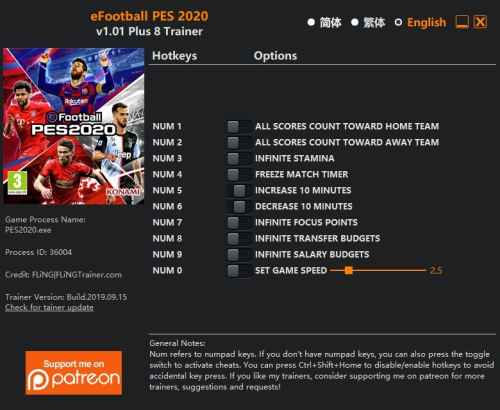 OPTIONS Num 1 – All Scores Count Toward Home Team Num 2 – All Scores Count Toward Away Team Num 3 – Infinite Stamina Num 4 – Freeze Match Timer Num 5 – Increase 10 Minutes Num 6 – Decrease 10 Minutes Num 7 – Infinite Focus Points Num 8 – Infinite Transfer Budgets Num 9 – Infinite Salary Budgets Num 0 – Set Game Speed NOTES “All Scores Count Toward Home/Away Team”: Whenever a score is made, it will always count toward home/away team depends on which option you activated. “Infinite Transfer Budgets” and “Infinite Salary Budgets” take effect when you enter negotiation menu.
-
Visulizar Arquivo Trainer eFootball PES 2020 {FLiNG} OPTIONS Num 1 – All Scores Count Toward Home Team Num 2 – All Scores Count Toward Away Team Num 3 – Infinite Stamina Num 4 – Freeze Match Timer Num 5 – Increase 10 Minutes Num 6 – Decrease 10 Minutes Num 7 – Infinite Focus Points Num 8 – Infinite Transfer Budgets Num 9 – Infinite Salary Budgets Num 0 – Set Game Speed NOTES “All Scores Count Toward Home/Away Team”: Whenever a score is made, it will always count toward home/away team depends on which option you activated. “Infinite Transfer Budgets” and “Infinite Salary Budgets” take effect when you enter negotiation menu. Autor 403 - Forbiddeen Enviado 16-09-2019 Categoria Cheats / Trainers / Mods
-
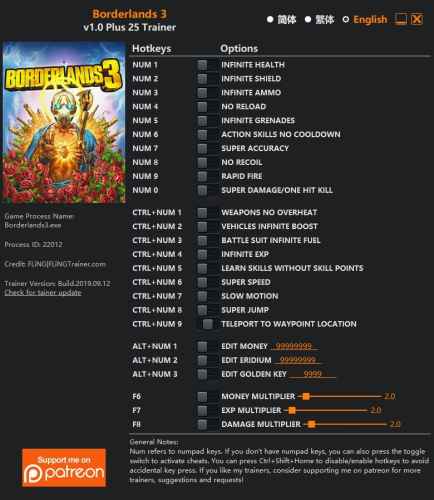 BORDERLANDS 3: TRAINER +25 V1.0 {FLING} OPTIONS Num 1 – Infinite Health Num 2 – Infinite Shield Num 3 – Infinite Ammo Num 4 – No Reload Num 5 – Infinite Grenades Num 6 – Action Skills No Cooldown Num 7 – Super Accuracy Num 8 – No Recoil Num 9 – Rapid Fire Num 0 – Super Damage/One Hit Kill Ctrl+Num 1 – Weapons No Overheat Ctrl+Num 2 – Vehicles Infinite Boost Ctrl+Num 3 – Battle Suit Infinite Fuel Ctrl+Num 4 – Infinite Exp Ctrl+Num 5 – Learn Skills Without Skill Points Ctrl+Num 6 – Super Speed Ctrl+Num 7 – Slow Motion Ctrl+Num 8 – Super Jump Ctrl+Num 9 – Teleport To Waypoint Location Alt+Num 1 – Edit Money Alt+Num 2 – Edit Eridium Alt+Num 3 – Edit Golden Key F6 – Money Multiplier F7 – Exp Multiplier F8 – Damage Multiplier NOTES “Infinite Health” and “Infinite Shield” take effect when you take damage; “Infinite Ammo” will set your ammo to max (exact value depends on the weapons); “Infinite Grenades” takes effect when you use grenades. “Infinite Health” also works for your battle suit and vehicle. While driving vehicles, don’t activate “Super Damage/One Hit Kill”, as it will also one hit kills your vehicle. You can use damage multiplier if needed, but you would also need to use “Infinite Health” to keep your vehicle health full. “Infinite Exp” takes effect when you gain Exp. “Learn Skills Without Skill Points” will set your skill point to zero so you won’t see the annoying message that tells you to spend unused skill points. “Edit Money”, “Edit Eridium”, and “Edit Golden Key”: After activated, open inventory to see the values change. “Edit Eridium”: You need to obtain at least one Eridium for it to work. “Edit Golden Key”: You need to obtain at least one Golden Key for it to work. To get golden keys early in the game, the best way is just to use the shift codes (ZFKJ3-TT3BB-JTBJT-T3JJT-JWX9H) to get 3 golden keys reward instantly. The shift codes maybe time limited, if this one is outdated, you should be able to find others by googling.
-
Visulizar Arquivo Trainer Borderlands 3 {FLiNG} BORDERLANDS 3: TRAINER +25 V1.0 {FLING} OPTIONS Num 1 – Infinite Health Num 2 – Infinite Shield Num 3 – Infinite Ammo Num 4 – No Reload Num 5 – Infinite Grenades Num 6 – Action Skills No Cooldown Num 7 – Super Accuracy Num 8 – No Recoil Num 9 – Rapid Fire Num 0 – Super Damage/One Hit Kill Ctrl+Num 1 – Weapons No Overheat Ctrl+Num 2 – Vehicles Infinite Boost Ctrl+Num 3 – Battle Suit Infinite Fuel Ctrl+Num 4 – Infinite Exp Ctrl+Num 5 – Learn Skills Without Skill Points Ctrl+Num 6 – Super Speed Ctrl+Num 7 – Slow Motion Ctrl+Num 8 – Super Jump Ctrl+Num 9 – Teleport To Waypoint Location Alt+Num 1 – Edit Money Alt+Num 2 – Edit Eridium Alt+Num 3 – Edit Golden Key F6 – Money Multiplier F7 – Exp Multiplier F8 – Damage Multiplier NOTES “Infinite Health” and “Infinite Shield” take effect when you take damage; “Infinite Ammo” will set your ammo to max (exact value depends on the weapons); “Infinite Grenades” takes effect when you use grenades. “Infinite Health” also works for your battle suit and vehicle. While driving vehicles, don’t activate “Super Damage/One Hit Kill”, as it will also one hit kills your vehicle. You can use damage multiplier if needed, but you would also need to use “Infinite Health” to keep your vehicle health full. “Infinite Exp” takes effect when you gain Exp. “Learn Skills Without Skill Points” will set your skill point to zero so you won’t see the annoying message that tells you to spend unused skill points. “Edit Money”, “Edit Eridium”, and “Edit Golden Key”: After activated, open inventory to see the values change. “Edit Eridium”: You need to obtain at least one Eridium for it to work. “Edit Golden Key”: You need to obtain at least one Golden Key for it to work. To get golden keys early in the game, the best way is just to use the shift codes (ZFKJ3-TT3BB-JTBJT-T3JJT-JWX9H) to get 3 golden keys reward instantly. The shift codes maybe time limited, if this one is outdated, you should be able to find others by googling. Autor 403 - Forbiddeen Enviado 14-09-2019 Categoria Cheats / Trainers / Mods
-
-
 @Jefferson PS Ah, eu nem ligo. Eu comprei uma e estou esperando chegar para fazer um unboxing.
-
-
 Activating this trainer: If not state otherwise below, press F1 at main menu. Listen for 'Trainer Activated'. Press desired hotkey. All hotkeys can be changed on the trainer. Promo Options: NumPad6: Freeze Match Timer Trainer Options: # Budget NumPad1: Unlimited Transfer Budget NumPad2: Unlimited Salary Budget # Player NumPad3: Max Player Stats NumPad4: Perfect Player Form NumPad5: Unlimited Focus Points # Time NumPad6: Freeze Match Timer NumPad7: Set Realtime Minutes Of Match To (Slows Time Down) NumPad8: Set Realtime Minutes Of Match To (Reset) Notes: Unlimited Transfer Budget: While active click on 'Team Management' and then click on 'Negotiations' to get unlimited. Unlimited Salary Budget: While active click on 'Team Management' and then click on 'Negotiations' to get unlimited. Max Player Stats: In 'Become A Legend' mode click on 'Player' then on 'My data' and switch to last ability page, press hotkey and all of your stats will be maximized. This may also work on other players in other modes. Perfect Player Form: In 'Become A Legend' mode click on 'Player' then on 'My data' and switch to last ability page, press hotkey and the player form will be great. This may also work on other players in other modes. Unlimited Focus Points: While active in 'Become A Legend' mode click on 'Player' then on 'Training' and your focus points are unlimited. You may need to remove/spend a focus point before it becomes unlimited. Set Realtime Minutes Of Match To (Slows Time Down): Slow down the overall match time or if you change the modifier value to something small, it speeds it up.
-
Visulizar Arquivo Trainer eFootball PES 2020 {CheatsHappens} Activating this trainer: If not state otherwise below, press F1 at main menu. Listen for 'Trainer Activated'. Press desired hotkey. All hotkeys can be changed on the trainer. Promo Options: NumPad6: Freeze Match Timer Trainer Options: # Budget NumPad1: Unlimited Transfer Budget NumPad2: Unlimited Salary Budget # Player NumPad3: Max Player Stats NumPad4: Perfect Player Form NumPad5: Unlimited Focus Points # Time NumPad6: Freeze Match Timer NumPad7: Set Realtime Minutes Of Match To (Slows Time Down) NumPad8: Set Realtime Minutes Of Match To (Reset) Notes: Unlimited Transfer Budget: While active click on 'Team Management' and then click on 'Negotiations' to get unlimited. Unlimited Salary Budget: While active click on 'Team Management' and then click on 'Negotiations' to get unlimited. Max Player Stats: In 'Become A Legend' mode click on 'Player' then on 'My data' and switch to last ability page, press hotkey and all of your stats will be maximized. This may also work on other players in other modes. Perfect Player Form: In 'Become A Legend' mode click on 'Player' then on 'My data' and switch to last ability page, press hotkey and the player form will be great. This may also work on other players in other modes. Unlimited Focus Points: While active in 'Become A Legend' mode click on 'Player' then on 'Training' and your focus points are unlimited. You may need to remove/spend a focus point before it becomes unlimited. Set Realtime Minutes Of Match To (Slows Time Down): Slow down the overall match time or if you change the modifier value to something small, it speeds it up. Autor 403 - Forbiddeen Enviado 11-09-2019 Categoria Cheats / Trainers / Mods
-
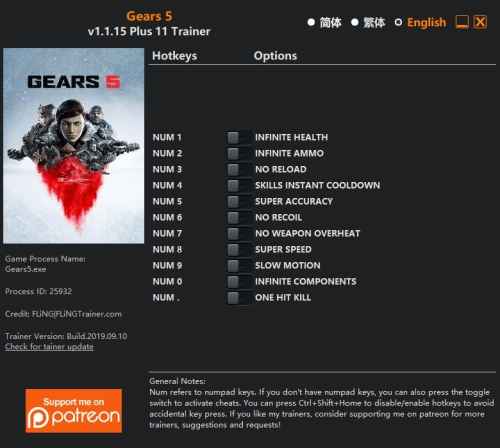 Trainer options Numpad 1 - Infinite Health Numpad 2 - Infinite Ammo Numpad 3 - No Reload Numpad 4 - Skills Instant Cooldown Numpad 5 - Super Accuracy Numpad 6 - No Recoil Numpad 7 - No Weapon Overheat Numpad 8 -Super Speed Numpad 9 - Slow Motion Numpad 0 - Infinite Components Numpad (.) - One Hit Kill Note: This game uses EasyAntiCheat protection, in order to launch this game without EAC enabled, please follow these instructions: If you have never launched the game before, you need launch the game normally and create an account first. Then close the game. Disconnect from internet. (This is required) Copy the trainer to the same folder where Gears5.exe is at. (Gears5.exe and the trainer should be in the same folder) Run the trainer first, then launch the game. You can reconnect the internet after the game launched, but you won’t be able to play online multiplayer mode. This trainer is for single player only.
-
Visulizar Arquivo Trainer Gears of War 5 / Gears 5 {FLiNG} Trainer options Numpad 1 - Infinite Health Numpad 2 - Infinite Ammo Numpad 3 - No Reload Numpad 4 - Skills Instant Cooldown Numpad 5 - Super Accuracy Numpad 6 - No Recoil Numpad 7 - No Weapon Overheat Numpad 8 -Super Speed Numpad 9 - Slow Motion Numpad 0 - Infinite Components Numpad (.) - One Hit Kill Note: This game uses EasyAntiCheat protection, in order to launch this game without EAC enabled, please follow these instructions: If you have never launched the game before, you need launch the game normally and create an account first. Then close the game. Disconnect from internet. (This is required) Copy the trainer to the same folder where Gears5.exe is at. (Gears5.exe and the trainer should be in the same folder) Run the trainer first, then launch the game. You can reconnect the internet after the game launched, but you won’t be able to play online multiplayer mode. This trainer is for single player only. Autor 403 - Forbiddeen Enviado 11-09-2019 Categoria Cheats / Trainers / Mods
-
-
Ótimo upload, obrigado.
-
@Freitas Arts Ótima ideia, vou pegar todos os dados por categoria e enviar para vocês.
-
Ficou ótimo o artigo. Sei que tem mais funções na loja, mas iremos liberando elas aos poucos.
-
@jlaM Opá agradeço. A ideia é facilitar mesmo, o pessoal fica bem perdido sobre o que é ou não permitido.
-
@Raphael É possível sim. Eu mesmo mantive os 2. Quanto ao método de transferência... na verdade dá para clonar o Windows.
-
Somos um fórum de jogos, e tudo relacionado ao assunto é permitido postar, porém de acordo com nossas regras gerais, alguns temas, conteúdo e ações são extremamente proibidas dentro do GGames. Não é permitido postar warez ou links para download (1.4) de softwares pago, conteúdo adulto, racista, de ódio ou pedofilia (1.3) e realizar publicidade ilegal do fórum usando mensagem postal (1.1) ou através de links não autorizados no fórum (1.2).
-
Ver este tutorial Qual a diferença entre a Mi Band 4 chinesa X Global? A Mi Band 4 foi certificada em China em duas versões, XMSH07HM, que se refere a Mi Band 4 sem NFC e XMSH08HM, que se refere a versão com NFC e Assistente de voz. No caso da versão XMSH07HM, nenhum mistério : tanto a versão chinesa quanto a global são as mesmas (assim como já acontece na Band 3). Sendo assim, a Mi Band suportará multilinguagem via OTA (atualmente a Mi Band 4 só suporta inglês e chinês). Como aconteceu na versão 3, até que a atualização chegue, a versão chinesa só terá id Autor 403 - Forbiddeen Categoria Mobile (iOS / Android) Enviado 30-08-2019 11:12
-
A Mi Band 4 foi certificada em China em duas versões, XMSH07HM, que se refere a Mi Band 4 sem NFC e XMSH08HM, que se refere a versão com NFC e Assistente de voz. No caso da versão XMSH07HM, nenhum mistério : tanto a versão chinesa quanto a global são as mesmas (assim como já acontece na Band 3). Sendo assim, a Mi Band suportará multilinguagem via OTA (atualmente a Mi Band 4 só suporta inglês e chinês). Como aconteceu na versão 3, até que a atualização chegue, a versão chinesa só terá idioma INGLÊS caso o celular esteja em inglês. Caso contrário, a versão chinesa terá setado idioma chinês até que a update aconteça. Para e versão XMSH08HM a história muda. Para essa versão COM NFC não existe garantia de update, já que a mesma é exclusiva para mercado chinês. A pulseira da Versão 3 serve em ambas as versões da Mi Band 4. O texto, não é de minha autoria. Mas achei interessante publica-lo para deixar claro. Realizei apenas algumas correções na pontuação.
-
 Caramba, eu nem sabia que dava para fazer isso!!! Com certeza irei colocar em prática.
-
Passo 1: No menu Iniciar, digite “Ativar ou desativar recursos” e dê Enter. Passo 2: Desmarque a caixa de seleção Internet Explorer. Confirme a caixa de diálogo que aparece clicando em Sim, depois clique em Ok para desativar o navegador. Aguarde enquanto a janela desativa o Internet Explorer. Pronto. O Internet Explorer estará desativado. Caso você desejar reativar o navegador, basta seguir o passo 1 novamente e remarcar a caixa de seleção Internet Explorer.
-
Como desativar o Internet Explorer no Windows 7 Passo 1: No menu Iniciar, digite “Ativar ou desativar recursos” e dê Enter. Passo 2: Desmarque a caixa de seleção Internet Explorer. Confirme a caixa de diálogo que aparece clicando em Sim, depois clique em Ok para desativar o navegador. Aguarde enquanto a janela desativa o Internet Explorer. Pronto. O Internet Explorer estará desativado. Caso você desejar reativar o navegador, basta seguir o passo 1 novamente e remarcar a caixa de seleção Internet Explorer. Autor 403 - Forbiddeen Categoria Sistemas Operacionais Enviado 27-08-2019 23:23
-
Essa funcionalidade pode ser útil se quisermos encontrar uma música, vídeo ou outro arquivo de mídia reproduzido com frequência mais rapidamente, além de nos mostrar os arquivos de mídia que foram reproduzidos no programa. Apesar desse recurso possuir várias utilidades, no entanto, um histórico muito grande pode acabar gerando vários arquivos desnecessários e inúteis no disco rígido. Além disso, essa função também pode ser inconveniente para o usuário, caso ele não queira que outra pessoa veja o que foi reproduzido em seu player de mídia. Neste tutorial, ensinaremos como limpar o histórico e cache do Windows Media Player. Confira a seguir: Passo 1: No Windows Media Player, clique no botão Organizar, depois em Opções…. Uma janela abrirá. Passo 2: Clique na guia Privacidade, depois clique em Limpar histórico e em Limpar caches. O histórico e os cookies armazenados pelo Windows Media Player serão excluídos. Pronto. O histórico e o cache do Windows Media Player foram limpos. Caso você não queira que o Windows Media Player mantenha um histórico dos arquivos reproduzidos, basta desmarcar as opções Música, Vídeo, Imagens e Listas de Reprodução, depois clicar em Aplicar e em Ok.
-
Como limpar o histórico e cache do Windows Media Player Essa funcionalidade pode ser útil se quisermos encontrar uma música, vídeo ou outro arquivo de mídia reproduzido com frequência mais rapidamente, além de nos mostrar os arquivos de mídia que foram reproduzidos no programa. Apesar desse recurso possuir várias utilidades, no entanto, um histórico muito grande pode acabar gerando vários arquivos desnecessários e inúteis no disco rígido. Além disso, essa função também pode ser inconveniente para o usuário, caso ele não queira que outra p Autor 403 - Forbiddeen Categoria Sistemas Operacionais Enviado 27-08-2019 23:22
