


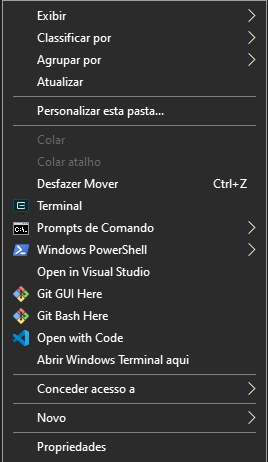
Eu sempre tinha dificuldade os bugs ao usar o Shift + Botão Direito do Mouse, ele as vezes me mostrava o PowerShell ao invés do CMD, com isso procurando na net devido a uma frustação de querer abrir o CMD em uma pasta e ao invés disso aparecia o PowerShell, então eu tinha que fazer tudo manualmente (abrir o Executar, digitar CMD, depois CD e a localização da pasta que eu queria), então eu encontrei um arquivo ao qual eu traduzi corretamente igual as informações do Windows, e anexei aqui, agora você pode ter os dois Terminais do Windows usando apenas o Botão Direito do Mouse, ou seja, não precisa mais do shift, ele deixa de forma mais prática e você pode abrir em qualquer lugar do Windows.
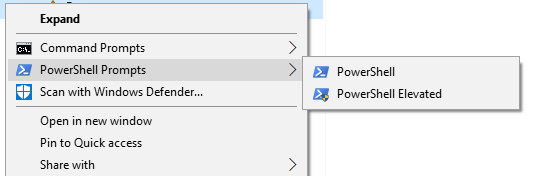
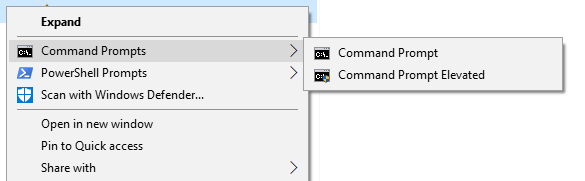
Veja os exemplos:
Power Shell
Prompt de Comando
Codigo fonte do arquivo em .reg:
Windows Registry Editor Version 5.00

; Command Prompt

[HKEY_CLASSES_ROOT\Directory\shell\01MenuCmd]
"MUIVerb"="Command Prompts"
"Icon"="cmd.exe"
"ExtendedSubCommandsKey"="Directory\\ContextMenus\\MenuCmd"

[HKEY_CLASSES_ROOT\Directory\background\shell\01MenuCmd]
"MUIVerb"="Command Prompts"
"Icon"="cmd.exe"
"ExtendedSubCommandsKey"="Directory\\ContextMenus\\MenuCmd"

[HKEY_CLASSES_ROOT\Directory\ContextMenus\MenuCmd\shell\open]
"MUIVerb"="Command Prompt"
"Icon"="cmd.exe"

[HKEY_CLASSES_ROOT\Directory\ContextMenus\MenuCmd\shell\open\command]
@="cmd.exe /s /k pushd \"%V\""

[HKEY_CLASSES_ROOT\Directory\ContextMenus\MenuCmd\shell\runas]
"MUIVerb"="Command Prompt Elevated"
"Icon"="cmd.exe"
"HasLUAShield"=""

[HKEY_CLASSES_ROOT\Directory\ContextMenus\MenuCmd\shell\runas\command]
@="cmd.exe /s /k pushd \"%V\""


; PowerShell

[HKEY_CLASSES_ROOT\Directory\shell\02MenuPowerShell]
"MUIVerb"="PowerShell Prompts"
"Icon"="powershell.exe"
"ExtendedSubCommandsKey"="Directory\\ContextMenus\\MenuPowerShell"

[HKEY_CLASSES_ROOT\Directory\background\shell\02MenuPowerShell]
"MUIVerb"="PowerShell Prompts"
"Icon"="powershell.exe"
"ExtendedSubCommandsKey"="Directory\\ContextMenus\\MenuPowerShell"

[HKEY_CLASSES_ROOT\Directory\ContextMenus\MenuPowerShell\shell\open]
"MUIVerb"="PowerShell"
"Icon"="powershell.exe"

[HKEY_CLASSES_ROOT\Directory\ContextMenus\MenuPowerShell\shell\open\command]
@="powershell.exe -noexit -command Set-Location '%V'"

[HKEY_CLASSES_ROOT\Directory\ContextMenus\MenuPowerShell\shell\runas]
"MUIVerb"="PowerShell Elevated"
"Icon"="powershell.exe"
"HasLUAShield"=""

[HKEY_CLASSES_ROOT\Directory\ContextMenus\MenuPowerShell\shell\runas\command]
@="powershell.exe -noexit -command Set-Location '%V'"


; Ensure OS Entries are on the Extended Menu (Shift-Right Click)

[HKEY_CLASSES_ROOT\Directory\shell\cmd]
"Extended"=""

[HKEY_CLASSES_ROOT\Directory\background\shell\cmd]
"Extended"=""

[HKEY_CLASSES_ROOT\Directory\shell\Powershell]
"Extended"=""

[HKEY_CLASSES_ROOT\Directory\background\shell\Powershell]
"Extended"=""
Baixe aqui o arquivo já no ponto de executar:
Se gostou deixa o curtir ? e testa ai para ver se funcionou corretamente.
Comentários Recomendados
Crie uma conta ou entre para comentar