Ir para conteúdo
View in the app

A better way to browse. Learn more.

GGames Fórum

A full-screen app on your home screen with push notifications, badges and more.

To install this app on iOS and iPadOS
  1. Tap the Share icon in Safari
  2. Scroll the menu and tap Add to Home Screen.
  3. Tap Add in the top-right corner.
To install this app on Android
  1. Tap the 3-dot menu (⋮) in the top-right corner of the browser.
  2. Tap Add to Home screen or Install app.
  3. Confirm by tapping Install.

Adicionando CPF e RG no PDF do WooCommerce Print Invoice & Delivery Note

Uma dica ótima para facilitar seu dia a dia.
https://g.ggames.com.br/tutorials/article/330-adicionando-cpf-e-rg-no-pdf-do-woocommerce-print-invoice-delivery-note/

Hoje uma cliente me pediu para adicionar o campo CPF e RG no PDF do pedido do Woocommerce. A ideia é ajudar ela a emitir as notas fiscais. Para fazer isso é simples, basta copiar e colar esse código no FUNCTIONS.PHP do seu tema. Lembre-se que precisa ter o WooCommerce Print Invoice & Delivery Note instalado.

function example_custom_order_fields( $fields, $order ) {
    $new_fields = array();

    if( get_post_meta( $order->get_id(), '_billing_cpf', true ) ) {
        $new_fields['_billing_cpf'] = array( 
            'label' => 'CPF',
            'value' => get_post_meta( $order->get_id(), '_billing_cpf', true )
        );
    }
	    if( get_post_meta( $order->get_id(), '_billing_rg', true ) ) {
        $new_fields['_billing_rg'] = array( 
            'label' => 'RG',
            'value' => get_post_meta( $order->get_id(), '_billing_rg', true )
        );
    }
    return array_merge( $fields, $new_fields );
	
}
add_filter( 'wcdn_order_info_fields', 'example_custom_order_fields', 10, 2 );

Segue resultado final.
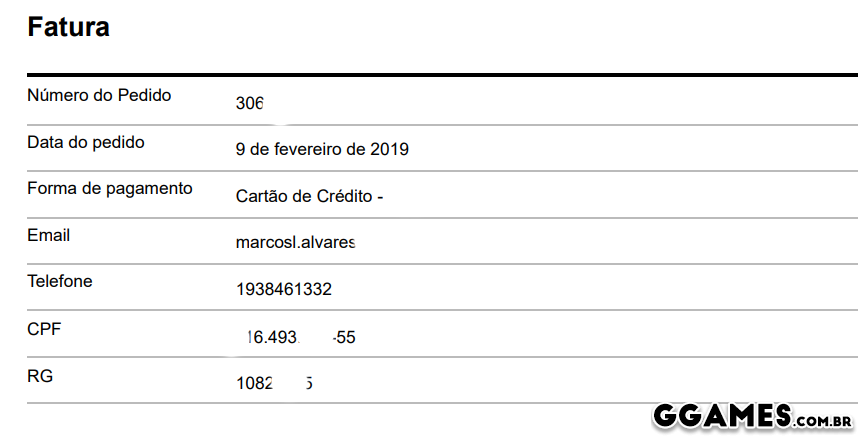
image.png

https://g.ggames.com.br/tutorials/article/330-adicionando-cpf-e-rg-no-pdf-do-woocommerce-print-invoice-delivery-note/

Feedback do Usuário

Comentários Recomendados

badtenvo

Leecher

Postado

bom dia, obrigado pela dica, gostaria de colocar o número de parcelas que foi realizada no pedido.

Crie uma conta ou entre para comentar

Configure browser push notifications

Chrome (Android)
  1. Tap the lock icon next to the address bar.
  2. Tap Permissions → Notifications.
  3. Adjust your preference.
Chrome (Desktop)
  1. Click the padlock icon in the address bar.
  2. Select Site settings.
  3. Find Notifications and adjust your preference.