Ir para conteúdo
View in the app

A better way to browse. Learn more.

GGames Fórum

A full-screen app on your home screen with push notifications, badges and more.

To install this app on iOS and iPadOS
  1. Tap the Share icon in Safari
  2. Scroll the menu and tap Add to Home Screen.
  3. Tap Add in the top-right corner.
To install this app on Android
  1. Tap the 3-dot menu (⋮) in the top-right corner of the browser.
  2. Tap Add to Home screen or Install app.
  3. Confirm by tapping Install.

Se você como nós usam ícones nas categorias, é comum passar pelo problema com o padrão dos mesmos. 

Para resolver isso é simples, basta definir um MAX-WIDTH para eles, então nunca vão ultrapassar esse tamanho, além de continuarem responsivos.

.ipsItemStatus:not( .ipsItemStatus_large ) {max-width: 45px;}

Em 45px você defini o limite. Copie e cole o código em custom.css no seu IPS.
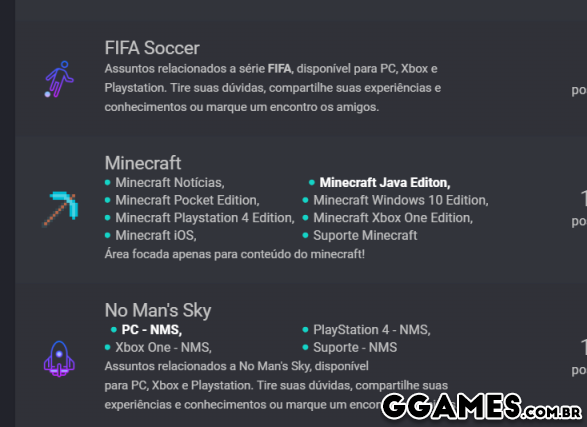
image.png

O ícone do MINECRAFT era bem maior que os demais, com o código isso foi resolvido.

Feedback do Usuário

Comentários Recomendados

Não há comentários para mostrar.

Crie uma conta ou entre para comentar

Configure browser push notifications

Chrome (Android)
  1. Tap the lock icon next to the address bar.
  2. Tap Permissions → Notifications.
  3. Adjust your preference.
Chrome (Desktop)
  1. Click the padlock icon in the address bar.
  2. Select Site settings.
  3. Find Notifications and adjust your preference.