


Notou que seu banco de dados está gordinho? Nesse exemplo são mais de 1GB de informações descartáveis!

Para limpar é fácil, vá em SISTEMAS > CONFIGURAÇÕES, lá no final localize AVANÇADO > SISTEMA.
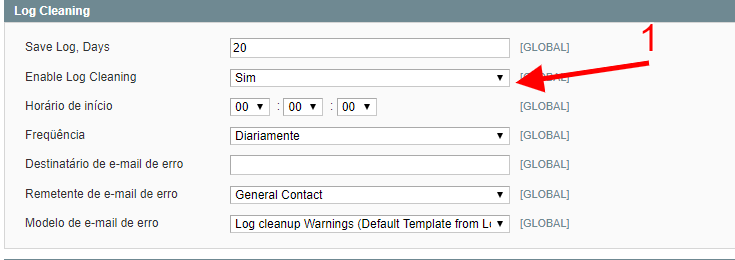
Em LOG CLEANING, ative o método de limpeza. Em SAVE LOG, por padrão fica 180 dias, eu mudei para 20.
Para concluir, limpe o CACHE e em seguida e processe um REINDEX.
Agora se você não quer esperar o servidor trabalhar, vamos EXCLUIR os dados salvo no banco! Execute esse comando em seu banco de dados, será o suficiente para eliminar as tabelas.
TRUNCATE dataflow_batch_export;
TRUNCATE dataflow_batch_import;
TRUNCATE log_customer;
TRUNCATE log_quote;
TRUNCATE log_summary;
TRUNCATE log_summary_type;
TRUNCATE log_url;
TRUNCATE log_url_info;
TRUNCATE log_visitor;
TRUNCATE log_visitor_info;
TRUNCATE log_visitor_online;
TRUNCATE report_viewed_product_index;
TRUNCATE report_compared_product_index;
TRUNCATE report_event;
TRUNCATE index_event;
Faça um backup antes!
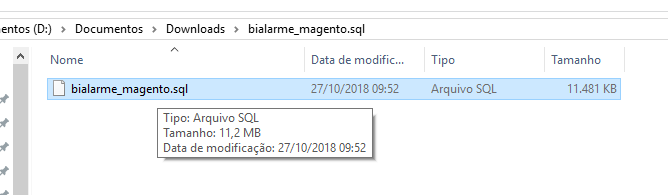
Fiz o download do banco de dados, como podem ver... apenas 11MB! Eliminei quase 95% de lixo.
Esse é o registro do CPANEL (tinha quase 2gb de banco de dados).

Prints por FORBIDDEEN e instruções, SQL por stackoverflow

Comentários Recomendados
Crie uma conta ou entre para comentar