


- Visualizações 33.2k
- Criado
- Última resposta
Posts Recomendados
Arquivado
Este tópico foi arquivado e está fechado para novas respostas.
Conteúdo Similar
-
- 0 respostas
- 907 visualizações
-
- 3 comentários
- 7617 visualizações
-
- 0 respostas
- 1002 visualizações
-
- 0 respostas
- 1052 visualizações

08_10.09_9c2b9509.thumb.jpg.c5ffe6f12780b127deb70139457f92cb.jpg)


Foi jogar e se decepcionou quando iniciou o Cyberpunk 2077 e estava em inglês? Saiba que é fácil de resolver.
1. Basta ir em PROPRIEDADES do jogo no Steam.
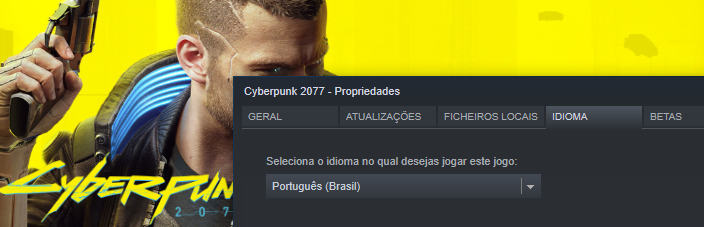
2. Trocar o idioma para PORTUGUÊS.
3. Feito isso, o download da dublagem e da tradução do jogo vai começar.
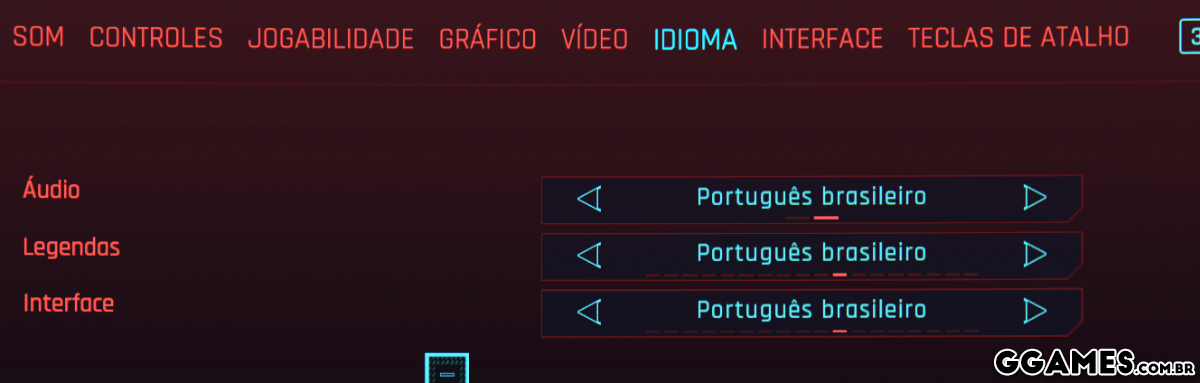
4. Agora abra o seu jogo, vá em configurações > idioma e troque tudo para português brasil.
Prontinho, espero ter ajudado.
Aproveite e veja também Como desativar o sensor de nudez no Cyberpunk 2077
Já visitou nosso Portal de Notícias? Eu garanto que você vai adorar.