Pbisnetto11
Moderador
-
Registro em
-
Última visita
Arquivos postados por Pbisnetto11
-
Activating this trainer
If not state otherwise below, press F1 at main menu.
Listen for 'Trainer Activated'.
Press desired hotkey. All hotkeys can be changed on the trainer.
Trainer Options
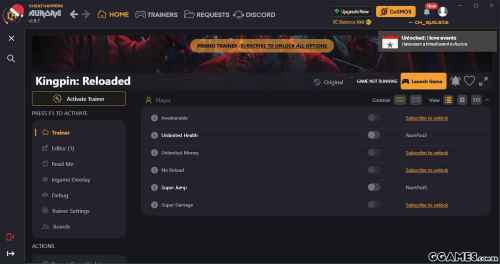
# Player
NumPad1: Invulnerable
NumPad2: Unlimited Health
NumPad3: Unlimited Money
NumPad4: No Reload
NumPad5: Super Jump
NumPad6: Super Damage
Editor Options
# Player
Game Speed
- 29 Downloads
Por Pbisnetto11 -
Activating this trainer
If not state otherwise below, press F1 at main menu.
Listen for 'Trainer Activated'.
Press desired hotkey. All hotkeys can be changed on the trainer.
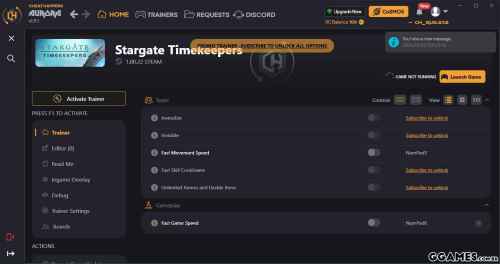
Trainer Options
# Team
NumPad1: Invincible
NumPad2: Invisible
NumPad3: Fast Movement Speed
NumPad4: Fast Skill Cooldowns
NumPad5: Unlimited Ammo and Usable Items
# Gameplay
NumPad6: Fast Game Speed
- 28 Downloads
Por Pbisnetto11 -
Activating this trainer
If not state otherwise below, press F1 at main menu.
Listen for 'Trainer Activated'.
Press desired hotkey. All hotkeys can be changed on the trainer.
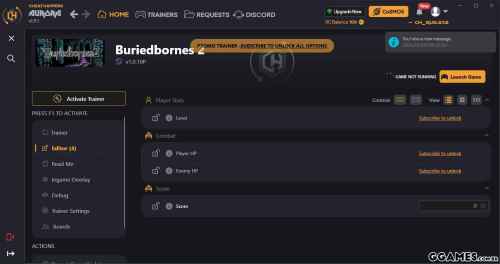
Trainer Options
# Currency
NumPad1: Mega Currency
Editor Options
# Player Stats
Level
# Combat
Player HP
Enemy HP
# Score
Score
Notes
Mega Currency:
Toggle on at map and then click MENU the SAVE DATA, but you don't have to save. You can then BUY things with the currency and the value will show once you spend.
Level:
While in DUNGEON, right click, then click CHARACTER, then click CHARACTER and the level will show up and you can edit it. Your OTHER STATS won't change until something causes a change in stats to trigger.
- 27 Downloads
Por Pbisnetto11 -
Activating this trainer
If not state otherwise below, press F1 at main menu.
Listen for 'Trainer Activated'.
Press desired hotkey. All hotkeys can be changed on the trainer.
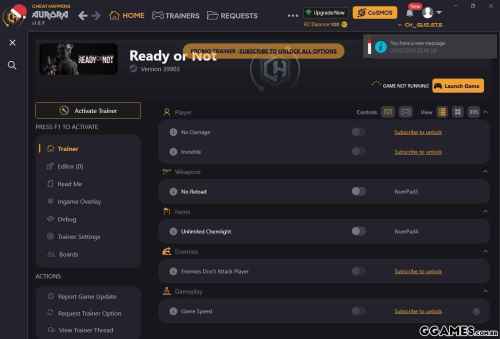
Trainer Options
# Player
NumPad1: No Damage
NumPad2: Invisible
# Weapons
NumPad3: No Reload
# Items
NumPad4: Unlimited Chemlight
# Enemies
NumPad5: Enemies Don't Attack Player
# Gameplay
NumPad6: Game Speed
- 331 Downloads
Por Pbisnetto11 -
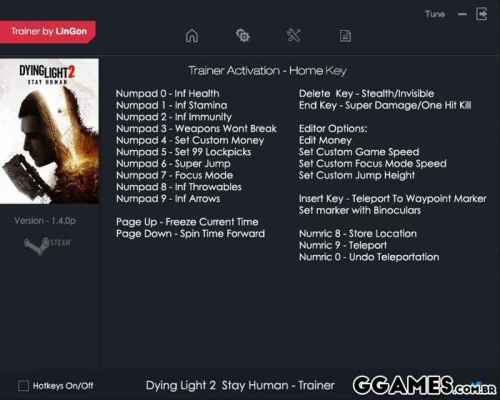
Options:
TRAINER ACTIVATION - HOME KEY
NUMPAO 0 - INFINITE HEALTH
NUMPAD 1 - INFINITE STAMINA
NUMPAD 2 - INFINITE IMMUNITY
NUMPAD 3 - WEAPONS WONT BREAK
NUMPAD 4 - SET CUSTOM MONEY
NUMPAD 5 - SET 99 LOCKPICKS
NUMPAD 6 - SUPER JUMP
NUMPAD 7 - FOCUS MODE
NUMPAD 8 - INFINITE THROWABLES
NUMPAD 9 - INFINITE ARROWS
PAGE UP - FREEZE CURRENT TIME
PAGE DOWN - SPIN TIME FORWARD
DELETE KEY - STEALTH/INVISIBLE
END KEY - SUPER DAMAGE/ONE HIT KILL
EDITOR OPTIONS:
EDIT MONEY
GAME SPEED
FOCUS MODE SPEED
JUMP HIGHT
INSERT KEY - TELEPORT TO WAYPOINT MARKER
NUMRIC 8 - STORE LOCATION
NUMRIC 9 - TELEPORT
NUMRIC 0 - UNDO TELEPORTATION
Note:
Open editor to set custom values for options editable
For money - enter the inventory to edit
For Super Jump - make sure to enable "infinite health" option or you might die when falling from a high distance
Enabling Focus Mode in editor allows for jumping and Wall Running in Slow Motion while holding the jump button on your keyboard or xbox 360 controller
Hotkey for this option is set to Numpad 7 aswell for quick access aswell.
- 28 Downloads
Por Pbisnetto11 -
Activating this trainer
If not state otherwise below, press F1 at main menu.
Listen for 'Trainer Activated'.
Press desired hotkey. All hotkeys can be changed on the trainer.
Trainer Options
# Player
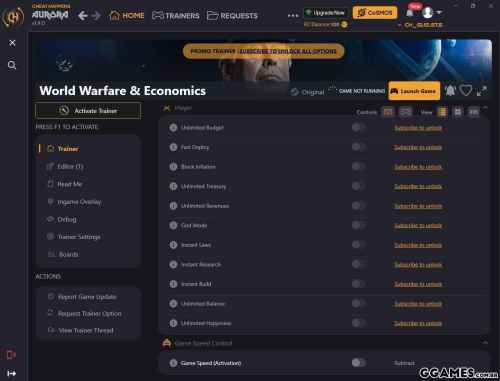
NumPad1: Unlimited Budget
NumPad2: Fast Deploy
NumPad3: Block Inflation
NumPad4: Unlimited Treasury
NumPad5: Unlimited Revenues
NumPad6: God Mode
NumPad7: Instant Laws
NumPad8: Instant Research
NumPad9: Instant Build
Multiply: Unlimited Balance
Add: Unlimited Happiness
# Game Speed Control
Subtract: Game Speed (Activation)
Editor Options
# Game
Game Speed
Notes
Game Speed:
In combination with 'Game Speed Control'.
- 45 Downloads
Por Pbisnetto11 -
Activating this trainer
If not state otherwise below, press F1 at main menu.
Listen for 'Trainer Activated'.
Press desired hotkey. All hotkeys can be changed on the trainer.
Trainer Options
# Player
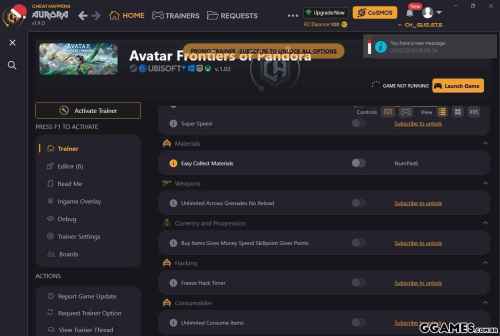
NumPad1: Unlimited Health
NumPad2: Unlimited Energy
NumPad3: Invisible
NumPad4: God Mode
NumPad5: Super Speed
# Materials
NumPad6: Easy Collect Materials
# Weapons
NumPad7: Unlimited Arrows Grenades No Reload
# Currency and Progression
NumPad8: Buy Items Gives Money Spend Skillpoint Gives Points
# Hacking
NumPad9: Freeze Hack Timer
# Consumables
Multiply: Unlimited Consume Items
# Gameplay
Add: Game Speed
Editor Options
# Player Stats
Health
Max Health
Energy
Max Energy
Fatigue
Max Fatigue
Notes
Easy Collect Materials:
When you collect materials, you get 20 of them.
Unlimited Arrows Grenades No Reload:
Best when you have more than 1 arrow left. When you fire the weapon or throw the item, it will decrease, then re-increase to where it was.
Buy Items Gives Money Spend Skillpoint Gives Points:
Toggle on and when you spend Scrap or when you spend Skillpoints, you will get 1000 more instead of spending it. Toggle off when not needed.
Unlimited Consume Items:
Toggle on and you can consume items. This is most useful for buffs or eating to refill hunger. Also works with Healing Pouch items.
- 36 Downloads
Por Pbisnetto11 -
Activating this trainer
If not state otherwise below, press F1 at main menu.
Listen for 'Trainer Activated'.
Press desired hotkey. All hotkeys can be changed on the trainer.
Trainer Options
# Gameplay
NumPad1: Game Speed
Editor Options
# Resources
Shards Collected
Current Shards
# Units
Slammers
# Progression
Prestige Level Points
Talent Points
- 66 Downloads
Por Pbisnetto11 -
Options:
Num 0 Infinite Health
Num 1 One Hit Kill
Num 2 Infinite Armor
Num 3 Infinite Stamina
Num 4 Infinite Oxygen
Num 5 Unlimited Ammo
Num 6 No Reload
Num 7 Unlimited Throwables
Num 8 Unlimited Syringes
Num 9 Unl. Special Syringes
Num / (Divide) Unlimited Rucksack
Num * (Multiply) Max. Karma Points
Num - (Sub) Max. Exp. Points
Num + (Add) Get 20 Skillpoints
CTRL + Num 0 Get 666.666.666 Rupien
CTRL + Num 1 Stealth Mode
CTRL + Num 2 Unlock Weapons
CTRL + Num 3 Stealth Mode
CTRL + Num 4 Unlock Weapons
- 2717 Downloads
Por Pbisnetto11 -
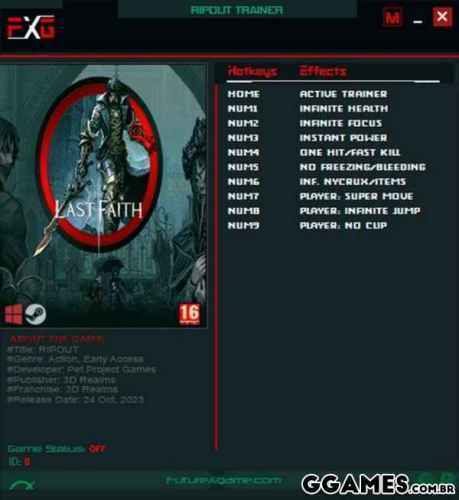
Options:
HOME Active Trainer
Numpad1 Infinite Health (No Decrease)
Numpad2 Infinite Focus (No Decrease)
Numpad3 Instant Power
Numpad4 One Hit/Fast Kill
Numpad5 No Freezing / Bleeding / Burned
Numpad6 Infinite Nycrux / Items / Bullets(Ammo) / Consumables
Numpad7 Player: Super Movement
Numpad8 Player: Infinite Jump
Numpad9 Player: No Clip (Set Position: CTRL + Up,Down,Left,Rigth Arrow)
- 2093 Downloads
Por Pbisnetto11 -
Options:
Trainer Activation - Home Key
Numric 1 - Inf Health
Numric 2 - Inf Ability
Numric 3 - Inst Ability "Cooldown"
Numric 4 - Inf Bow Arrows
Numric 5 - Inf Air Dash
Numric 6 - Super Jump
Numric 7 - Easy Enemies
Numric 8 - Add Time Crystals
Numric 9 - Add Damascus Ignot
Numric 0 - Add Currency XERXES
Delete - Enable Infinite Ju9ips "use spacebar key to climb in air"
Page Up - Speed Up
Page Down - Slowmotion
- 233 Downloads
Por Pbisnetto11 -
Activating this trainer
If not state otherwise below, press F1 at main menu.
Listen for 'Trainer Activated'.
Press desired hotkey. All hotkeys can be changed on the trainer.
Trainer Options
# Player
NumPad1: Max Resources
NumPad2: Enable All of the Resources
NumPad3: Fast Construction
NumPad4: Unlimited People Health
NumPad5: Unlimited People Ration
NumPad6: Unlimited People Water
NumPad7: Unlimited People Tool
NumPad8: Unlimited People Cloth
NumPad9: Zero People Sickness
Multiply: Unlimited People Morale
# Game
Add: Game Speed Control
Editor Options
# Player
Game Speed
# Resouces
Log
Stone
Iron Ore
Mushroom
Meat
Water
Simple Meal
Iron Ingot
Basic Tools
Leather
Clothes
Clay
Paper
Lumber
Notes
Game Speed :
Enable Game Speed Control first.
- 30 Downloads
Por Pbisnetto11 -
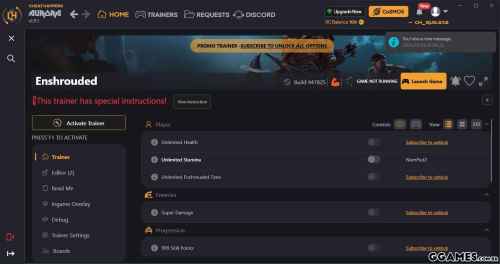
CHEAT DESCRIPTION:
Activating this trainer
If not state otherwise below, press F1 at main menu.
Listen for 'Trainer Activated'.
Press desired hotkey. All hotkeys can be changed on the trainer.
Trainer Options
# Player
NumPad1: Unlimited Health
NumPad2: Unlimited Stamina
NumPad3: Unlimited Enshrouded Time
# Enemies
NumPad4: Super Damage
# Progression
NumPad5: 999 Skill Points
# Inventory
NumPad6: Move Item in Inventory Gives 99
NumPad7: Unlimited Use Quickbar Items
# Items
NumPad8: Infinite Item Durability
# Crafting
NumPad9: Easy Craft
# Gameplay
Multiply: Game Speed
Editor Options
# Player Progression
Level
EXP
Notes
The trainer is made for private / local game only.
999 Skill Points:
This will temporarily give you 999 points.
- 85 Downloads
Por Pbisnetto11 -
Activating this trainer
If not state otherwise below, press F1 at main menu.
Listen for 'Trainer Activated'.
Press desired hotkey. All hotkeys can be changed on the trainer.
Trainer Options
# Player
NumPad1: Invulnerable Player Ship
NumPad2: Unlimited Ship Ammunition
NumPad3: Invulnerable Character
NumPad4: Unlimited Character Health
NumPad5: Unlimited Stamina
NumPad6: Super Damage
# Game
NumPad7: Game Speed
- 100 Downloads
Por Pbisnetto11 -
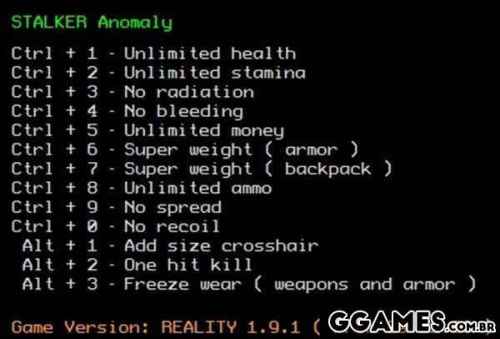
Options:
Unlimited health
Unlimited stamina
No radiation
No bleeding
Unlimited ammo
Unlimited money
Unlimited weight
No recoil
No spread
One hit kill
No reload
Freeze wear
Add size crosshair
- 78 Downloads
Por Pbisnetto11 -
Activating this trainer
If not state otherwise below, press F1 at main menu.
Listen for 'Trainer Activated'.
Press desired hotkey. All hotkeys can be changed on the trainer.
Trainer Options
# Team Combat
NumPad1: Unlimited HP
NumPad2: Unlimited Mana
# Enemies
NumPad3: Weak Enemies
# Inventory
NumPad4: Unlimited Use Consumables
NumPad5: Obtain All Consumable Items in Menu
NumPad6: Obtain All Skill Cards
# Items Needed
NumPad7: Easy Open Chests
# Gameplay
NumPad8: Game Speed
Editor Options
# Resource
Yen
# Time and Date
Month and Day value 5-371
Time value 2-9
Next Month and Day value 5-371
Next Time value 2-9
# Social Stats
Academic
Charm
Courage
# Selected Unit Stats
Current HP
Current SP
Level
EXP
# Selected Unit Stats Persona
Type
Level
EXP
ST
MA
EN
AG
LU
# Selected Persona Stats
Type
Level
EXP
ST
MA
EN
AG
LU
Notes
Save often! Doing things you aren't supposed to be able to do to this game, such as going back or forward in time could have unintended results or break scripts.
Yen:
Press TAB to enter MENU
Month and Day value 5-371:
You can rewind or do all sorts of things UNINTENDED by the game. Make sure you have SAVES before toying around with the game date and time.
Academic:
Press TAB to enter MENU, then STATS, then SELECT YOUR UNIT, then select SOCIAL STATS
Current HP:
Press TAB to enter MENU, then STATS, then SELECT the UNIT you wish to see.
Type:
Press TAB to enter MENU, then STATS, then SELECT the UNIT you wish to see. For YOUR player, this will show Persona 1 only.
Type:
Press TAB to enter MENU, then PERSONA, then select the PERSONA you wish to edit then select STATS.
- 34 Downloads
Por Pbisnetto11 -
Activating this trainer
If not state otherwise below, press F1 at main menu.
Listen for 'Trainer Activated'.
Press desired hotkey. All hotkeys can be changed on the trainer.
Trainer Options
# Chapters
NumPad1: Unlock Chapters
# Resources
NumPad2: Unlimited Resources
# Camp Operations
NumPad3: Fast Camp Improvements
NumPad4: Fast Produce Items
NumPad5: Fast Rest
NumPad6: Fast Rehab
NumPad7: Fast Operations
NumPad8: Invincible Staff
NumPad9: Easy Feed Troops
Multiply: Fast Graveyard
# Gameplay
Add: Super Game Speed
- 14 Downloads
Por Pbisnetto11 -
Trainer Options
# Combatant Left
NumPad1: Left Invincible
NumPad2: Left Unlimited Heat
NumPad3: Left Quick Heal
NumPad4: Left Quick Lose
# Combatant Right
NumPad5: Right Invincible
NumPad6: Right Unlimited Heat
NumPad7: Right Quick Heal
NumPad8: Right Quick Lose
# VS CPU Matches
NumPad9: Left Easy Win Battle
Multiply: Right Easy Win Battle
# Timer
Add: Freeze Round Timer
Notes
RIGHT player is usually the computer or opponent in story mode.
If you are playing story and it seems stuck or AI stops reacting, you may have to go to CHAPTER SELECT and select the chapter again and turn of the particular option that may be offending. Read each option instructions.
As stated multiple times in the trainer options, the game is HEAVILY SCRIPTED. Parts of the game you maybe are SUPPOSED to lose, or are SUPPOSED to take damage to a certain level, or the AI isn't supposed to DIE all at once, etc. Turn off or on options if you see certain issues.
Some options may not work or will work differently in the STORY mode where you are taking on many units at once.
Trainer is for offline mode for STORY or against CPU.
Left Invincible:
Right Invincible:
Invincible option prevents damage or even contact. Note that some of the game is scripted so that you MUST take damage in some instances or get damaged to a certain level. So if the game seems stuck or the opponent won't die, toggle OFF, then let them beat you down until it triggers.
Left Quick Heal:
Right Quick Heal:
Press and the health tops off.
Left Quick Lose:
Right Quick Lose:
WARNING! This is a powerful option. GENERALLY, the match will be over and this player will drop down dead. NOTE! If the game is scripted for the character to lose health gradually or die some other way, this may cause the game to be in a broken script, and you will have to select CHAPTER again. This is very useful for VS matches, or matches in the story where there is not much scripted story.
Left Easy Win Battle:
Right Easy Win Battle:
Only for VS CPU and battles where you have to win 3 matches to win. This will make it so you already have 2 wins, and the next win will win the battle.
- 205 Downloads
Por Pbisnetto11 -
Trainer Options
# Player
NumPad1: Invulnerable
NumPad2: Immortal Mode
NumPad3: Unlimited Health
NumPad4: Unlimited Pal Health
NumPad5: Unlimited Stamina
NumPad6: Unlimited Satiety
NumPad7: Super Damage
NumPad8: %100 Pal Capture Rate
NumPad9: All Pals Are Lucky / Rare
Multiply: No Pal Skill Cooldown
Add: Unlimited Weapon Durability
Subtract: No Grappling Hook Cooldown
Decimal: No Reload
Divide: No Recoil
F1: No Hunger
F2: Zero Weight
F3: Unlimited Stat Points
F4: Unlimited Technology Points
F5: Unlock All Technology Recipes
F6: Unlimited EXP
F7: Free Build
F8: Instant Build
F9: Free Craft
F10: Instant Craft
F11: No Base Build Limit
F12: No Frostbite
F13: Unlimited Partner Ability (Lifmunk Recoil)
F14: Instant Pal Breed
F15: Instant Egg Hatch
F16: %100 Drop Rate
F17: Build Anywhere
F18: Unlimited Base Buildings Health
F19: Decrease Body Temperature
F20: Increase Body Temperature
# Time
F21: Advance Time
F22: Freeze Time
F23: Decrease Time
# Inventory
F24: Refresh Inventory Editor
NumLock: Prevent Ammo and Item Depletion
# Key Items
Scroll: Add 5 Keys to Each Key Item
LeftShift: Unlimited Lifmunk Effigies
RightShift: Subtract 5 Keys From Each Key Item
# Player Movement
LeftCtrl: Fly
RightCtrl: No Clip
LeftAlt: Hover Player Higher
RightAlt: Hover Player Lower
BrowserBack: Increase Player Speed
BrowserForward: Decrease Player Speed
BrowserRefresh: Set Normal Player Speed
BrowserStop: Increase Jump Height
BrowserSearch: Decrease Jump Height
BrowserFavorites: Set Normal Jump Height
BrowserHome: Decrease Gravity
VolumeMute: Increase Gravity
VolumeDown: Set Normal Gravity
# Enemy
VolumeUp: Decrease Enemy Speed
MediaNextTrack: Increase Enemy Speed
MediaPreviousTrack: Freeze Enemies
MediaStop: Set Normal Enemy Speed
# Teleport
MediaPlayPause: Save Position Slot 1
LaunchMail: Save Position Slot 2
SelectMedia: Save Position Slot 3
LaunchApplication1: Save Position Slot 4
LaunchApplication2: Save Position Slot 5
Oem1: Restore Position Slot 1
OemPlus: Restore Position Slot 2
OemComma: Restore Position Slot 3
OemMinus: Restore Position Slot 4
OemPeriod: Restore Position Slot 5
# Game
OemQuestion: Game Speed
Editor Options
# Player
EXP
EXP Multiplier
Level
Stat Points
Technology Points
Ancient Technology Points
Money Multiplier
Damage Multplier
Harvest Multiplier
# Inventory
Slot 1 - Slot 50
# Keys
Lifmunk Effigies
Key Amount to Add or Remove
# Player Movement
Player Speed Multiplier
Jump Multiplier
Gravity Multiplier
# Enemy
Enemy Speed Multiplier
Notes
Immortal Mode:
This option is another variation of No Hunger.
Zero Weight:
Enable this at main menu before loading your save game.
Free Craft:
Warning: Once enabled then effects are permanent in the CURRENT seesion until you restart your game.
No Base Build Limit:
This option allows you to build many bases as you like without a limit.
Refresh Inventory Editor:
Use this to refresh the inventory editor.
Prevent Ammo and Item Depletion :
Make sure to disable this before acquiring crafts and picking up items.
Slot 1:
Use 'Refresh Inventory Editor' first.
Key Amount to Add or Remove:
With this option you can add or remove keys from your total key items, for example if you want to add 5 to each key item then set this to 5 or if you want to remove 5 then set it to negative respectively.
- 124 Downloads
Por Pbisnetto11 -
OPTIONS
Num 1 – Infinite Health
Num 2 – Infinite Stamina
Num 3 – Infinite Dead Eye
Num 4 – Infinite Horse Health
Num 5 – Infinite Horse Stamina
Num 6 – Infinite Ammo
Num 7 – No Reload
Num 8 – Infinite Items
Num 9 – Set Game Speed
Num 0 – Stealth Mode
Ctrl+Num 1 – Set Money
Ctrl+Num 2 – No Bounty
NOTES
Health/Stamina/Dead Eye options take effects when values decrease (take damage, use dead eye, running, etc). Note these options don’t affect core values, only affect the outer bar values (For example, if you health bar is depleted, you’ll lose core health and can be killed).
“Infinite Ammo” and “No Reload” take effects when shooting.
“Infinite Items” takes effect when item decreases, item quantity will set to stackable max.
“Infinite Health” can’t prevent instant death (fall off the cliff, QTE failed, headshot, etc). Note: it doesn’t affect core health, you need to have some health in the health bar for it to work.
“Set Money” takes effect when money changes; “No Bounty” takes effect when bounty increases.
“Stealth Mode”: When activated, most people won’t fight back and you won’t be wanted.
UPDATES
2020.10.22: Update for v1311.23 game version.
2020.07.29: Update for v1311.12 game version.
2020.04.03: Update for v1232.48 game version.
2020.03.09: Update for v1232.40 game version.
2020.01.14: Update for v1232.17 game version.
2019.12.14: Added “Stealth Mode” option. Update for v1232.13 game version.
2019.12.05: Update for v1207.80 game version.
2019.11.27: Update for v1207.77 game version.
2019.11.19: Update for v1207.73 game version.
2019.11.08:
1. Added “Set Money” and “No Bounty” options.
2. Fixed a problem where “Infinite Items” resets money to below 99. Updated “Set Game Speed” for better compatibility.
- 79 Downloads
Por Pbisnetto11 -
OPTIONS
Num 1 – Infinite Health
Num 2 – Infinite Energy
Num 3 – Infinite Ammo/Grenades
Num 4 – No Reload
Num 5 – No Weapon Overheat
Num 6 – Max Accuracy
Num 7 – No Recoil
Num 8 – Rapid Fire
Num 9 – Jam Enemy Weapons
Num 0 – One Hit Kill
Num . – Stealth Mode
Num + – Set Game Speed
NOTES
“Stealth Mode”: If you activate this option after you are detected, you’ll need to get out of battle for it to work.
UPDATES
2020.10.22: Update for v1.2.0 game version.
- 127 Downloads
Por Pbisnetto11 -
OPTIONS
Num 1 – Infinite Health
Num 2 – Max Shield/Block
Num 3 – Infinite Stamina
Num 4 – No Hunger
Num 5 – No Thirst
Num 6 – Infinite Oxygen
Num 7 – Infinite Analyzer Charges
Num 8 – Infinite Items
Num 9 – Infinite Tools Durability
Num 0 – One Hit Kill
Num . – Freeze Daytime
Num + – Daytime +1 Hour
Num – – Daytime -1 Hour
Ctrl+Num 1 – Edit Raw Science
Ctrl+Num 2 – Set Game Speed
Ctrl+Num 3 – Set Move Speed
Ctrl+Num 4 – Infinite Jumps
Ctrl+Num 5 – No Crafting Requirement
Ctrl+Num 6 – Easy Building/Min. Building Requirement
NOTES
“Infinite Items” takes effect when item quantity decreases, the item quantity will set to max stackable count.
“Infinite Tools Durability” takes effect when durability decreases.
“No Crafting Requirement” if you want to disable this option after crafting requirements have changed, you need to restart the game for them to restore.
“Easy Building/Min. Building Requirement”: When activated, you only need to put 1 material to the building site to complete the building.
UPDATES
2020.10.02: Update for v20200930 game version.
- 343 Downloads
Por Pbisnetto11 -
OPTIONS
Num 1 – Infinite Health
Num – – Invincible/Immune To All Damages
Num 2 – Infinite Stamina
Num 3 – Max Sharpness
Num 4 – Infinite Item Pouch Items
Num 5 – Infinite Slinger Ammo
Num 6 – Mantles No Cooldown
Num 7 – Set Game Speed
Num 8 – One Hit Destroy Body Parts
Num 9 – One Hit Wound (Easy Capture)
Num 0 – One Hit Kill
Num . – 100% Critical Hit
Num + – Super Weapon Elemental Effects
Ctrl+Num 1 – Edit Zenny
Ctrl+Num 2 – Edit Research Points
Ctrl+Num 3 – Infinite Lucky Vouchers
Ctrl+Num 4 – Edit Item Quantity (Item Box)
Ctrl+Num 5 – No Equipment Upgrade Requirement
Ctrl+Num 6 – No Equipment Forge Requirement
Ctrl+Num 7 – No Equipment Augmentation Requirement
Ctrl+Num 8 – Max Palico Level
Ctrl+Num 9 – Max Palico Gadget Proficiency
Ctrl+Num 0 – Max Tailraiders Level
Ctrl+Num . – Palico Gadgets No Cooldown
Ctrl+Num + – Discover All Monsters On Map
Ctrl+Num – – Stealth Mode
Ctrl+Home – Infinite Buff Duration
Ctrl+PageUp – Show Monster Health (Lock On)
Ctrl+Insert – Edit Player’s Name
Ctrl+Delete – Edit Palico’s Name
Alt+Insert – Infinite Character Edit Vouchers
Alt+Delete – Infinite Palico Edit Vouchers
Ctrl+F1 – Research Point Multiplier
Ctrl+F2 – Hunter Exp Multiplier
Ctrl+F3 – Damage Multiplier
Ctrl+F4 – Get All Rewards (Normal+Rare)
Ctrl+F5 – 10x Bonus/Expedition Rewards
Ctrl+F6 – Max Monster Research Level
Ctrl+F7 – Infinite Mantles Duration
Ctrl+F8 – Infinite Resource Gathering
Ctrl+F9 – Ignore Augmentation Slot (Master Rank)
Ctrl+F10 – Master Exp Multiplier
Ctrl+F11 – Defense Multiplier
Alt+F5 – Max Guiding Lands Region Level
Alt+F6 – Max Decoration Slots And Level
Alt+F7 – Change Hunter Rank
Alt+F8 – Change Master Rank
Alt+F9 – Infinite Investigations
Alt+F10 – Edit Guiding Lands Lures
Alt+F11 – Max Decoration Skill Level
Alt+F12 – Easy Unlock Armor Set Skill
Alt+Num 1 – Long Sword: Max Spirit Gauge
Alt+Num 2 – Great Sword: Instant Charge
Alt+Num 3 – Hammer: Quick Charge
Alt+Num 4 – Charge Blade: Max Charge
Alt+Num 5 – Switch Axe: Amped State
Alt+Home – Switch Axe: Max Charge
Alt+Num 6 – Gunlance: No Reload
Alt+Num 7 – Gunlance: No Overheat
Alt+Num 8 – Bow: Instant Charge
Alt+Num 9 – Dual Blades: Max Demon Gauge
Alt+Num 0 – Insect Glaive: Infinite Extract Duration
Alt+Num . – All Bowguns: No Reload
Alt+Num + – All Bowguns: No Deviation
Alt+Num – – Heavy Bowgun: Rapid Fire
Alt+PageUp – All Bowguns: Ignore Range (Best Damage)
Alt+End – All Weapons: Max Frostcraft
NOTES
“Infinite Health” locks your health at max, but if you receive damage more than your max health in one hit, you will still be dead. You can also use “Invincible/Immune To All Damages” for better effects (you won’t be hit).
“Infinite Item Pouch Items” works for consumables and ammo (for ammo, you need to open item pouch to take effect).
“Equipment Upgrade Requirement” does not work for armors, you can use “Edit Item Quantity (Item Box)” to get upgrade materials for armors.
“Max Palico Level”, “Max Palico Gadget Proficiency”, “Max Tailraiders Level” take effects when you complete a mission.
“Max Monster Research Level” takes effect when research progress increases (e.g. track footprints, kill, capture, break parts, etc).
“Heavy Bowgun: Rapid Fire” only works for the special ammo (Wyvernheart).
“Show Monster Health (Lock On)” only work in DirectX 11 windowed/borderless windowed fullscreen mode. It will not work in exclusive fullscreen mode or DirectX 12.
“Change Hunter Rank” and “Hunter Exp Multiplier”: You hunter rank is locked until you beat the main story. These options only work after you finished the main story. Note there are level caps at lv29 and lv49, you’ll need to complete specific missions in order to break the level cap.
“Change Master Rank” and “Master Exp Multiplier”: Your master rank is locked until you beat the iceborne story, this option only work after you finished the iceborne story. Note there are level caps at lv49, lv69 and lv99, you’ll need to complete specific missions in order to break the level cap.
“Max Guiding Lands Region Level” takes effect when you slay a monster in guiding lands.
“Max Decoration Slots And Level” temporary unlocks all equipment decoration slots, when this option disabled, slots will restore to normal, but the decorations you already put in the slots will still have effects.
“Defense Multiplier” reduces the damage you receive, it does not affect you actual defense stat.
“Change Hunter Rank” only accept values between 16 and 999 (lv1-15 is set by story progress); “Change Master Rank” only accept values between 24 and 999 (lv1-23 is set by story progress).
“Infinite Investigations” takes effect when you start an investigation mission.
“Easy Unlock Armor Set Skill”: You only need one piece of armor to unlock its armor set skill.
“Max Decoration Skill Level” takes effect when you select decorations in set decorations menu. Note this option is not permanent, skill levels will reset after restarting the game. To make it work a gain, go to set decorations menu again and select the decorations (you don’t need to change them).
“Edit Player’s Name” and “Edit Palico’s Name”: After activating these options, save your game and reload the save file to see the names change. Note: the maximum length for character/palico’s name is 24 bytes in utf8 encoding (24 English letters/8-12 Unicode characters).
“Infinite Character Edit Vouchers” and “Infinite Palico Edit Vouchers”: Your actual vouchers will still be used (if you have any), but you can edit character/palico even if you don’t have any vouchers. These options are not permanent, when they are disabled, the number of vouchers will restore to normal.
“Infinite Buff Duration” works for all buffs including negative buffs, it will also prevent some buffs from appearing. You may want to disable this option when necessary.
“Edit Item Quantity (Item Box)”: This option also locks your appraisal items, you need to disable this option when doing appraisal, otherwise it will never end because you have infinite items to appraise.
“No Equipment Augmentation Requirement” and “Ignore Augmentation Slot (Master Rank)”: You need available slot for these options to work. If you already used all slots, remove some augmentations and use then “Ignore Augmentation Slot (Master Rank)” to reinstall all the augmentations.
SPECIAL NOTES
This trainer requires MOD “Performance Booster and Plugin Extender” to bypass crc memory check/anti tamper in the game, please follow these steps:
1. Install “Stracker’s Loader” (required for Performance Booster and Plugin Extender) from:
https://www.nexusmods.com/monsterhunterworld/mods/1982
2. Install “Performance Booster and Plugin Extender” mod from:
https://www.nexusmods.com/monsterhunterworld/mods/3473
3. Restart the game and trainer.
Note: If the game crashes after installing mods, you may need to install the latest Microsoft Visual C++ Redistributable: https://support.microsoft.com/en-us/help/2977003/the-latest-supported-visual-c-downloads
UPDATES
2020.10.02: Update for v20201001 game version.
- 515 Downloads
Por Pbisnetto11 -
OPTIONS
Num 1 – Infinite Health
Num 2 – Infinite Stamina
Num 3 – Infinite Items/Ammo
Num 4 – No Reload
Num 5 – Zero Weight
Num 6 – Infinite Weapon Durability
Num 7 – Super Accuracy
Num 8 – No Recoil
Num 9 – Infinite Fuel
Num 0 – Easy Level Up
Alt+Num 1 – No Fatigue
Alt+Num 2 – No Blood Plague
Alt+Num 3 – No Crafting Material Requirements
Alt+Num 4 – Instant Crafting & Building
Alt+Num 5 – Instant Radio Cooldown
Ctrl+Num 1 – Infinite Resources
Ctrl+Num 2 – Freeze Daytime
Ctrl+Num 3 – Daytime +1 Hour
Ctrl+Num 4 – Daytime -1 Hour
Ctrl+Num 5 – Set Game Speed
NOTES
“Zero Weight”: If you’are overburdened, after activating this option, drop or pick up something to remove the overburdened effect.
“Easy Level Up”: When you gain XP for a skill/stat, it will instantly level up to max.
“Daytime -1 Hour”: Note when decreasing time, the day count will always increase by 1.
“No Crafting Material Requirements”: Activate before interacting with facilities.
“Infinite Health”: Note this option works for all humans, including hostile humans. You should disable it when fighting humans.
UPDATES
2020.10.02: Update for v21 game version.
2020.06.25: Update for v18 game version.
2020.05.19: Update for v17 game version.
2020.03.27: Update for v15.1 game version; Added “No Fatigue”, “No Blood Plague”, “No Crafting Material Requirements”, “Instant Crafting & Building”, “Instant Radio Cooldown” options.
- 45 Downloads
Por Pbisnetto11 -
OPTIONS
OPTIONS
Num 1 – Infinite Health
Num 2 – Infinite Ammo/Energy
Num 3 – Infinite Missiles
Num 4 – Infinite Boost
Num 5 – Max Power (Set Power To Balance Mode)
Num 6 – No Repair Cooldown
Num 7 – Rapid Fire
Num 8 – Set Game Speed
NOTES
“Max Power” takes effect when you set power to balance mode. If you want to disable and restore the effect, set power to balance mode again after disabling this option.
“No Repair Cooldown”: Note this option should activate before repair.
Special Notes
This game uses EasyAntiCheat protection, in order to launch this game without EAC, please follow these instructions:
1. Copy “starwarssquadrons_launcher.exe” to the game’s directory.
2. Start game.
- 24 Downloads
Por Pbisnetto11
GnorpApologue.thumb.jpg.4c15e23b2dab06ac95779e33b87c4300.jpg)