Jump to content
View in the app

A better way to browse. Learn more.

GGames Fórum

A full-screen app on your home screen with push notifications, badges and more.

To install this app on iOS and iPadOS
  1. Tap the Share icon in Safari
  2. Scroll the menu and tap Add to Home Screen.
  3. Tap Add in the top-right corner.
To install this app on Android
  1. Tap the 3-dot menu (⋮) in the top-right corner of the browser.
  2. Tap Add to Home screen or Install app.
  3. Confirm by tapping Install.

Trainer Stoneshard {FLING} V0.6.1.5-V0.7.0 plus 16

(0 reviews)
https://g.ggames.com.br/files/file/3676-trainer-stoneshard-fling/

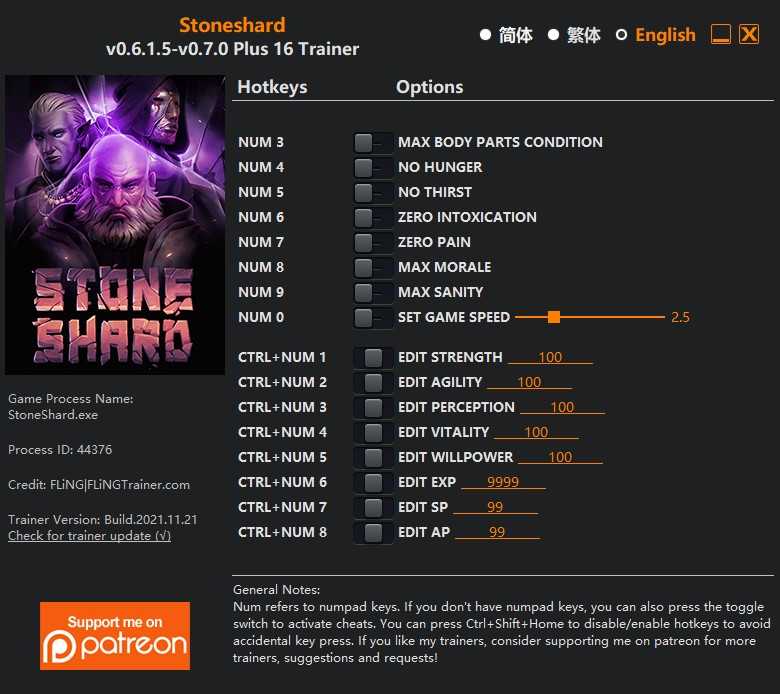
1 Screenshot


OPTIONS

  • Num 3 – Max Body Parts Condition
  • Num 4 – No Hunger
  • Num 5 – No Thirst
  • Num 6 – Zero Intoxication
  • Num 7 – Zero Pain
  • Num 8 – Max Morale
  • Num 9 – Max Sanity
  • Num 0 – Set Game Speed
  • Ctrl+Num 1 – Edit Strength
  • Ctrl+Num 2 – Edit Agility
  • Ctrl+Num 3 – Edit Perception
  • Ctrl+Num 4 – Edit Vitality
  • Ctrl+Num 5 – Edit Willpower
  • Ctrl+Num 6 – Edit EXP
  • Ctrl+Num 7 – Edit SP
  • Ctrl+Num 8 – Edit AP

NOTES

After editing your character attributes, you’ll need to manually level up your attributes once in order to update your character stats.

“Edit Perception”: Note this attribute affects the range of certain skills/magics. Setting it too high may cause game lag.


https://g.ggames.com.br/files/file/3676-trainer-stoneshard-fling/

User Feedback

You may only provide a review once you have downloaded the file.

There are no reviews to display.

Configure browser push notifications

Chrome (Android)
  1. Tap the lock icon next to the address bar.
  2. Tap Permissions → Notifications.
  3. Adjust your preference.
Chrome (Desktop)
  1. Click the padlock icon in the address bar.
  2. Select Site settings.
  3. Find Notifications and adjust your preference.