Jump to content
View in the app

A better way to browse. Learn more.

GGames Fórum

A full-screen app on your home screen with push notifications, badges and more.

To install this app on iOS and iPadOS
  1. Tap the Share icon in Safari
  2. Scroll the menu and tap Add to Home Screen.
  3. Tap Add in the top-right corner.
To install this app on Android
  1. Tap the 3-dot menu (⋮) in the top-right corner of the browser.
  2. Tap Add to Home screen or Install app.
  3. Confirm by tapping Install.

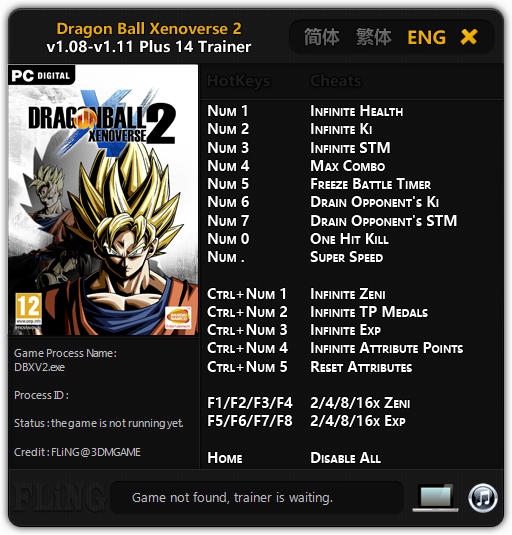
Trainer Dragon Ball Xenoverse 2 {FLiNG} +14 1.11

(3 reviews)
https://g.ggames.com.br/files/file/367-trainer-dragon-ball-xenoverse-2-fling-14/

1 Screenshot

Numpad 1 - Saúde Infinita
Numpad 2 - Infinito Ki
Numpad 3 - STM Infinito
Numpad 4 - Max Combo
Numpad 5 - Congelar Temporizador de Batalha
Numpad 6 - Drenar Ki do Oponente
Numpad 7 - Drenar  STM do oponente
Numpad 0 - One Hit Kill
Numpad (.) - Super Velocidade
Ctrl + Numpad 1 - Zeni Infinito
Ctrl + Numpad 2 - Infinite TP Medals
Ctrl + Numpad 3 - Experiência Infinita
Ctrl + Numpad 4 - Pontos de Atributo Infinitos
Ctrl + Numpad 5 - Redefinir Atributos
F1 / F2 / F3 / F4 - 2/4/8 / 16x Zeni
F5 / F6 / F7 / F8 - Experiência 2/4/8 / 16x
Home - Desativar Tudo

https://g.ggames.com.br/files/file/367-trainer-dragon-ball-xenoverse-2-fling-14/

User Feedback

You may only provide a review once you have downloaded the file.


obrigado

   1 of 1 member found this review helpful 1 / 1 member

Show.... obrigado

   2 of 2 members found this review helpful 2 / 2 members

Agradecido.

Configure browser push notifications

Chrome (Android)
  1. Tap the lock icon next to the address bar.
  2. Tap Permissions → Notifications.
  3. Adjust your preference.
Chrome (Desktop)
  1. Click the padlock icon in the address bar.
  2. Select Site settings.
  3. Find Notifications and adjust your preference.