Jump to content
View in the app

A better way to browse. Learn more.

GGames Fórum

A full-screen app on your home screen with push notifications, badges and more.

To install this app on iOS and iPadOS
  1. Tap the Share icon in Safari
  2. Scroll the menu and tap Add to Home Screen.
  3. Tap Add in the top-right corner.
To install this app on Android
  1. Tap the 3-dot menu (⋮) in the top-right corner of the browser.
  2. Tap Add to Home screen or Install app.
  3. Confirm by tapping Install.

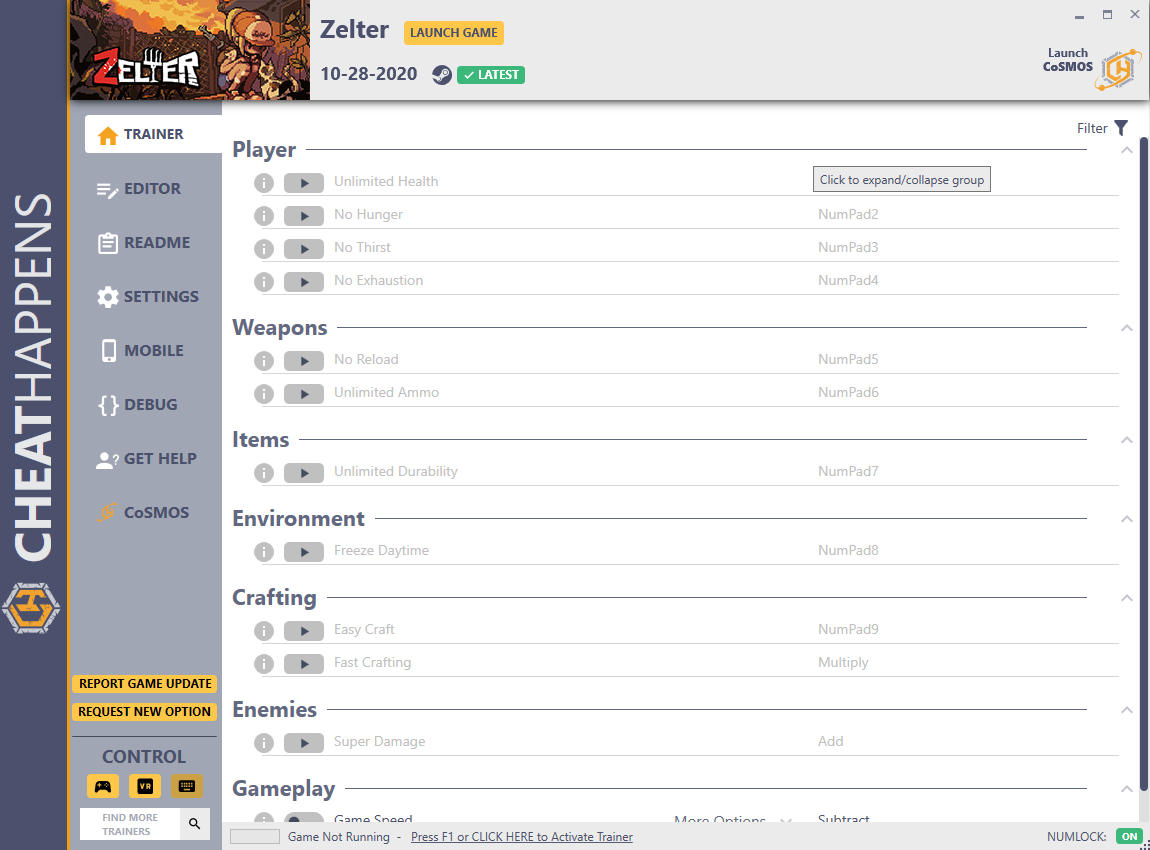
Trainer Zelter {CheatHappens} v10.28.2020 plus 19

(0 reviews)

1 Screenshot

Activating this trainer

If not state otherwise below, press F1 at main menu.

Listen for 'Trainer Activated'.

Press desired hotkey. All hotkeys can be changed on the trainer.


Promo Options

Separator: Game Speed


Trainer Options

# Player 

  •      NumPad1: Unlimited Health
  •      NumPad2: No Hunger
  •      NumPad3: No Thirst
  •      NumPad4: No Exhaustion

# Weapons 

  •      NumPad5: No Reload
  •      NumPad6: Unlimited Ammo

# Items 

  •      NumPad7: Unlimited Durability

# Environment 

  •      NumPad8: Freeze Daytime

# Crafting 

  •      NumPad9: Easy Craft
  •      Multiply: Fast Crafting

# Enemies 

  •      Add: Super Damage

# Gameplay 

  •      Subtract: Game Speed


Editor Options

# Player Stats 

  •      Attack
  •      Defense
  •      Craft Speed
  •      Horizontal Move Speed
  •      Luck
  •      Charm

# Inventory

  •      Recently moved item amount


User Feedback

You may only provide a review once you have downloaded the file.

There are no reviews to display.

Configure browser push notifications

Chrome (Android)
  1. Tap the lock icon next to the address bar.
  2. Tap Permissions → Notifications.
  3. Adjust your preference.
Chrome (Desktop)
  1. Click the padlock icon in the address bar.
  2. Select Site settings.
  3. Find Notifications and adjust your preference.