Jump to content
View in the app

A better way to browse. Learn more.

GGames Fórum

A full-screen app on your home screen with push notifications, badges and more.

To install this app on iOS and iPadOS
  1. Tap the Share icon in Safari
  2. Scroll the menu and tap Add to Home Screen.
  3. Tap Add in the top-right corner.
To install this app on Android
  1. Tap the 3-dot menu (⋮) in the top-right corner of the browser.
  2. Tap Add to Home screen or Install app.
  3. Confirm by tapping Install.

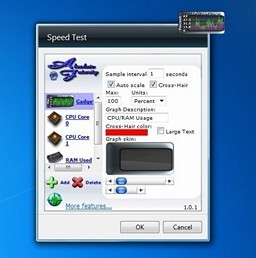
1 Screenshot

Com o Speed Test, você pode monitorar o uso da CPU (mais de 8 núcleos) e RAM por si só, e ele tem a capacidade de testar;

- Velocidade máxima da largura de banda (Internet Speed Test)
- Velocidade de download do seu próprio site, tempo de resposta e erros
- Espaço e atividade do disco rígido
- Tempo de resposta do ping - Tempo de resposta do
WIFI - Intensidade do sinal WIFI
- Status da carga da bateria
- Largura da banda da LAN
- Largura de banda da LAN - Upload e download de transferências de dados
- Processo único uso de memória

e muito mais...

123.png

Edited by LeandroSexy

What's New in Version 1.0.2

See changelog

Released

Novo Ícone e uma foto ilustrativa de como é o programa!

User Feedback

You may only provide a review once you have downloaded the file.


Bem prático, porém pouco intuitivo a interface. 


Muito bom.


vlw por compartilhar!


Ferramenta interessante. Multifuncional, quebra um galho legal.


Programa bastante útil. 


Bom, cumpre o que promete.

   1 of 1 member found this review helpful 1 / 1 member

Obrigado pelo upload. Muito bom. 

   1 of 1 member found this review helpful 1 / 1 member

valeu , muito bom

   1 of 1 member found this review helpful 1 / 1 member

Opa, legal. Obrigado!

   1 of 1 member found this review helpful 1 / 1 member

Muito bom!

   1 of 1 member found this review helpful 1 / 1 member

Promissor a proposta do programa, vou baixar pra verificar. Valeu!

Configure browser push notifications

Chrome (Android)
  1. Tap the lock icon next to the address bar.
  2. Tap Permissions → Notifications.
  3. Adjust your preference.
Chrome (Desktop)
  1. Click the padlock icon in the address bar.
  2. Select Site settings.
  3. Find Notifications and adjust your preference.