Jump to content
View in the app

A better way to browse. Learn more.

GGames Fórum

A full-screen app on your home screen with push notifications, badges and more.

To install this app on iOS and iPadOS
  1. Tap the Share icon in Safari
  2. Scroll the menu and tap Add to Home Screen.
  3. Tap Add in the top-right corner.
To install this app on Android
  1. Tap the 3-dot menu (⋮) in the top-right corner of the browser.
  2. Tap Add to Home screen or Install app.
  3. Confirm by tapping Install.

1 Screenshot

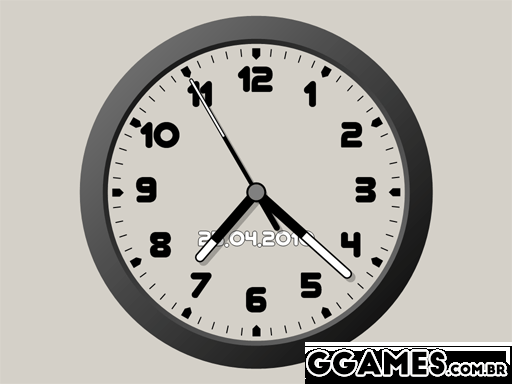
"Theme Clock-7" é um protetor de tela de freeware que exibe a hora atual. O protetor de tela usa o esquema de cores do sistema operacional Windows. Configurações: mostrar segundos: desligado, normal, volta total; mostrar logotipo: desativado, data atual, texto personalizado; mostrar dia da semana: ativado / desativado.
113.gif

Edited by LeandroSexy

What's New in Version 2.2

See changelog

Released

No changelog available for this version.

User Feedback

You may only provide a review once you have downloaded the file.


bom para quem gosta de personalizações. Obrigado pelo up!


Útil, ficou bem legal no meu PC 


Ferramentas de personalização... Amo


vlw por compartilhar!


Programa útil. Funcional. 


Bom protetor de tela. Apesar de hoje em dia ser meio obsoleto. 


interessante o app


Bom protetor de tela.


Legal a proposta do programa, vou baixar pra verificar. Obrigado!

Configure browser push notifications

Chrome (Android)
  1. Tap the lock icon next to the address bar.
  2. Tap Permissions → Notifications.
  3. Adjust your preference.
Chrome (Desktop)
  1. Click the padlock icon in the address bar.
  2. Select Site settings.
  3. Find Notifications and adjust your preference.