Ravock
VIP Vitalício
-
Registro em
-
Última visita
Arquivos postados por Ravock
-
Options:
Mega AP- 26 Downloads
Por Ravock -
Options:
Add 100 Selected Char Health Add 100 Selected Char Stamina Unlimited Gold Unlimited Potential Points Unlimited Skill Points Set Game Speed- 19 Downloads
Por Ravock -
Options:
Unlimited Health Unlimited Mana Add 500 Green Gems Add 100 Power Points Add 100 XP Set Game Speed- 16 Downloads
Por Ravock -
Options:
Unlimited Health Unlimited Party Health Unlimited Horse Health Unlimited Food Max Morale Unlimited Smithy Stamina Unlimited Gold Unlimited Influence Unlimited Renown Unlimited XP Unlimited Shield Durability One-Hit Kills Notice:
Read notes for each mod before activating them.
Mods may take sometime to activate so be patient after activating them.
P.S: Opt out of all BETA programs for the game by going to Manage Installation->Configure in GOG. Then infront of BETA channels select "Disabled"
- 27 Downloads
Por Ravock -
Options:
Unlimited Health Unlimited Party Health Unlimited Horse Health Unlimited Food Max Morale Unlimited Smithy Stamina Unlimited Gold Unlimited Influence Unlimited Renown Unlimited XP Unlimited Shield Durability One-Hit Kills Notice:
Read notes for each mod before activating them.
Mods may take sometime to activate so be patient after activating them.
P.S: Opt out of all BETA programs for the game by going to Manage Installation->Configure in GOG. Then infront of BETA channels select "Disabled"
- 28 Downloads
Por Ravock -
Options:
Edit Workers Edit Food Edit Wood Edit Stone Edit Steel Edit Bog Iron Edit Animal Skins Edit Clothes- 85 Downloads
Por Ravock -
Options:
Unlimited Money Money Multiplier Unlimited XP XP Multiplier Reset Timer Max Score Freeze AI Vehicles Unlock All Vechicles & Items- 30 Downloads
Por Ravock -
Options:
Unlimited Money Money Multiplier Unlimited XP XP Multiplier Reset Timer Max Score Freeze AI Vehicles Unlock All Vechicles & Items- 15 Downloads
Por Ravock -
Options:
Edit Money Max City Public Order Max City Population Unlimited Army Movement Restore Army Size One Turn Building One Turn Recruit Unlimited Mercenary Recruitments God Mode (In Battle) Money Multiplier Empty AI Money Empty AI Army Size Set Game Speed- 14 Downloads
Por Ravock -
OPTIONS
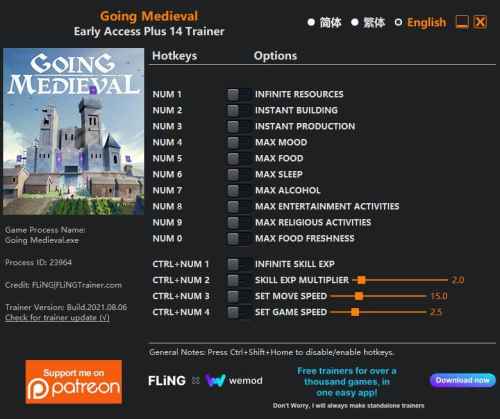
Num 1 – Infinite Resources Num 2 – Instant Building Num 3 – Instant Production Num 4 – Max Mood Num 5 – Max Food Num 6 – Max Sleep Num 7 – Max Alcohol Num 8 – Max Entertainment Activities Num 9 – Max Religious Activities Num 0 – Max Food Freshness Ctrl+Num 1 – Infinite Skill Exp Ctrl+Num 2 – Skill Exp Multiplier Ctrl+Num 3 – Set Move Speed Ctrl+Num 4 – Set Game Speed NOTES
“Infinite Resources”: Takes effect when you take out resource from resource pile, resource quantity will reset to max stackable amount. Note, if you take out all resources from the resource pile at once, it will disappear.
“Instant Building”: Activate before building start.
“Instant Production”: Activate before production start.
“Infinite Skill Exp”: Takes effect when workers gain skill exp.
“Set Move Speed”: Note the value represents movement speed in m/s (normal movement speed is about 3.5 m/s).
- 62 Downloads
Por Ravock -
OPTIONS
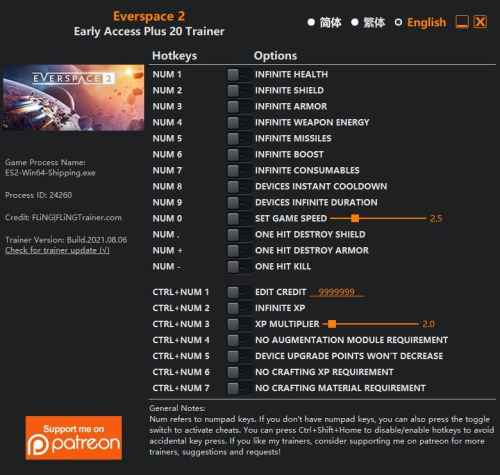
Num 1 – Infinite Health Num 2 – Infinite Shield Num 3 – Infinite Armor Num 4 – Infinite Weapon Energy Num 5 – Infinite Missiles Num 6 – Infinite Boost Num 7 – Infinite Consumables Num 8 – Devices Instant Cooldown Num 9 – Devices Infinite Duration Num 0 – Set Game Speed Num . – One Hit Destroy Shield Num + – One Hit Destroy Armor Num – – One Hit Kill Ctrl+Num 1 – Edit Credit Ctrl+Num 2 – Infinite XP Ctrl+Num 3 – XP Multiplier Ctrl+Num 4 – No Augmentation Module Requirement Ctrl+Num 5 – Device Upgrade Points Won’t Decrease Ctrl+Num 6 – No Crafting XP Requirement Ctrl+Num 7 – No Crafting Material Requirement NOTES
“Infinite Health”, “Infinite Shield”, “Infinite Armor”: Take effects when you receive damage.
“One Hit Kill”: Only works after enemy ship’s shield and armor are destroyed. Can be used with “One Hit Destroy Shield” and “One Hit Destroy Armor” to achieve true one hit kill effect.
“Edit Credit”: Takes effect when opening inventory.
“Infinite XP”: Takes effect when destroying enemy ships. Note the level cap could be 14 or higher depending on the game version.
“No Augmentation Module Requirement”: When activated, you can upgrade the ship without augmentation module.
“No Crafting Material Requirement”: When activated, you can craft items even if you don’t have any material, but if you do have materials, they will be consumed.
- 23 Downloads
Por Ravock -
OPTIONS
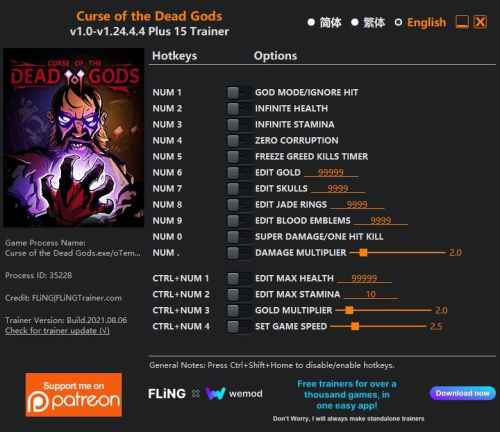
Num 1 – God Mode/Ignore Hit Num 2 – Unlimited Health Num 3 – Unlimited Stamina Num 4 – Zero Corruption Num 5 – Freeze Greed Kills Timer Num 6 – Edit Gold Num 7 – Edit Skulls Num 8 – Edit Jade Rings Num 9 – Edit Blood Emblems Num 0 – Super Damage/One Hit Kill Num . – Damage Multiplier Ctrl+Num 1 – Edit Max Health Ctrl+Num 2 – Edit Max Stamina Ctrl+Num 3 – Gold Multiplier Ctrl+Num 4 – Set Game Speed NOTES
“Unlimited Health”, “Edit Max Health”: Take effects when health value changes/updates.
“Zero Corruption”: Takes effect when corruption value changes/updates.
- 28 Downloads
Por Ravock -
OPTIONS
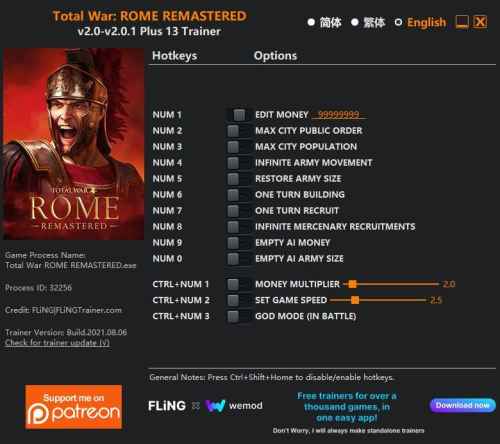
Num 1 – Edit Money Num 2 – Max City Public Order Num 3 – Max City Population Num 4 – Infinite Army Movement Num 5 – Restore Army Size Num 6 – One Turn Building Num 7 – One Turn Recruit Num 8 – Infinite Mercenary Recruitments Num 9 – Empty AI Money Num 0 – Empty AI Army Size Ctrl+Num 1 – Money Multiplier Ctrl+Num 2 – Set Game Speed Ctrl+Num 3 – God Mode (In Battle) NOTES
“One Turn Building”: Activate before choosing buildings.
“One Turn Recruit”: Activate before choosing units.
“God Mode (In Battle)”: Select one of your units in order to work.
- 27 Downloads
Por Ravock -
OPTIONS
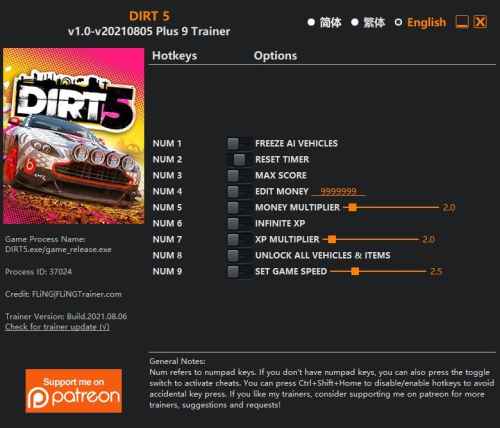
Num 1 – Freeze AI Vehicles Num 2 – Reset Timer Num 3 – Max Score Num 4 – Edit Money Num 5 – Money Multiplier Num 6 – Infinite XP Num 7 – XP Multiplier Num 8 – Unlock All Vehicles & Items Num 9 – Set Game Speed NOTES
“Infinite XP” takes effect when you gain XP.
“Max Score” takes effect when you gain score.
“Unlock All Vehicles & Items”: Temporary unlocks everything in the game. For purchasable items, this option unlocks the purchase requirement, you still need to purchase the item in order to use it.
- 38 Downloads
Por Ravock -
OPTIONS
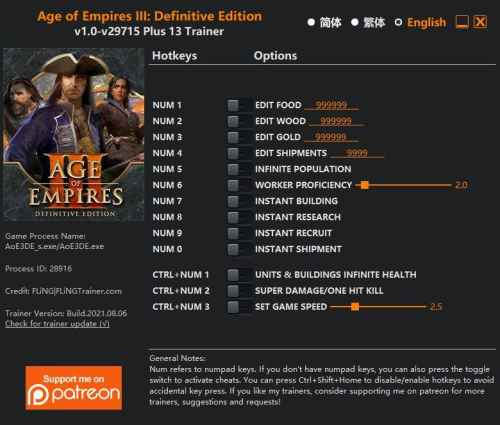
Num 1 – Edit Food Num 2 – Edit Wood Num 3 – Edit Gold Num 4 – Edit Shipments Num 5 – Infinite Population Num 6 – Worker Proficiency Num 7 – Instant Building Num 8 – Instant Research Num 9 – Instant Recruit Num 0 – Instant Shipment Ctrl+Num 1 – Units & Buildings Infinite Health Ctrl+Num 2 – Super Damage/One Hit Kill Ctrl+Num 3 – Set Game Speed NOTES
“Infinite Population” takes effect when population number changes, the population number will reset to 0, so you can recruit as many units as you want.
“Worker Proficiency” will multiply the number of resources workers gather, and their building speed, research speed, etc.
“Units & Buildings Infinite Health” takes effect when your units or buildings take damage, their health will reset to max.
- 44 Downloads
Por Ravock -
Options:
Unlimited Population Instant Research Add 1000 Food Add 1000 Wood Add 1000 Gold Add 1000 Exp Instant Construction Instant Recruiting Instant Shipment God Mode- 27 Downloads
Por Ravock -
Options:
Unlimited Health Unlimited Stamina No Skill Cooldown Unlimited Squad Points Set Element Zero Set Credit Set Platinum Set Palladium Set Iridium Set Medi-Gel Unlimited Ammo No Reload No Recoil Better Accuracy Notice:
Launch the game from the launcher before pressing play on the trainer.
- 21 Downloads
Por Ravock -
Options:
Unlimited Health Unlimited SP Unlimited Shield Super Damage- 35 Downloads
Por Ravock -
Options:
Unlimited Money Super Driving Skill Super First Aid Skill Super Technical Skill Super Accuracy Skill Max Efficiencies- 23 Downloads
Por Ravock -
Options:
Unlimited Food Unlimited Wood Unlimited Stone Unlimited Gold Max Population Cap Unlimited Population Unlimited Health Fast Construction Fast Recruiting Fast Upgrades Notice:
Startup the game and once its fully loaded press play on the trainer.
- 38 Downloads
Por Ravock -
Options:
Unlimited Food Unlimited Wood Unlimited Stone Unlimited Gold Max Population Cap Unlimited Population Unlimited Health Fast Construction Fast Recruiting Fast Upgrades Notice:
Startup the game and once its fully loaded press play on the trainer.
- 29 Downloads
Por Ravock -
Options:
Unlimited Health Unlimited Money Freeze Timer One Hit-Kill- 43 Downloads
Por Ravock -
Options:
Unlimited Health Unlimited Stamina Stable Temperature Unlimited Hydration No Hunger Unlimited Vitamins Unlimited Minerals Toggle Fly Mode Set Game Speed Notice:
You must use a custom launcher to be able to use the trainer, You can get the custom launcher with details from here Link
- 21 Downloads
Por Ravock -
Options:
Unlimited Health Unlimited Stars- 15 Downloads
Por Ravock -
OPTIONS
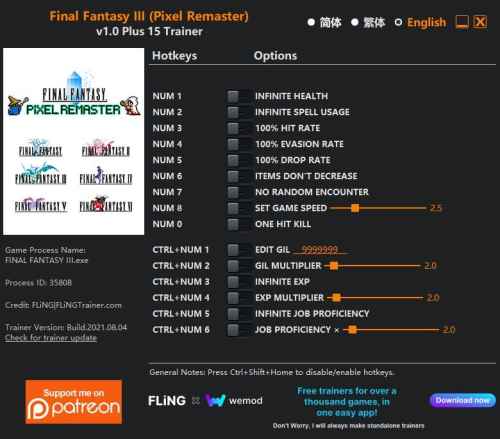
Num 1 – Infinite Health Num 2 – Infinite Spell Usage Num 3 – 100% Hit Rate Num 4 – 100% Evasion Rate Num 5 – 100% Drop Rate Num 6 – Items Don’t Decrease Num 7 – No Random Encounter Num 8 – Set Game Speed Num 0 – One Hit Kill Ctrl+Num 1 – Edit Gil Ctrl+Num 2 – Gil Multiplier Ctrl+Num 3 – Infinite Exp Ctrl+Num 4 – Exp Multiplier Ctrl+Num 5 – Infinite Job Proficiency Ctrl+Num 6 – Job Proficiency Multiplier NOTES
“Infinite Spell Usage”: When activated, spell usage will not decrease.
“100% Drop Rate”: Note not all enemies have item to drop.
“Items Don’t Decrease”: Item quantity must be greater than 1 for it to work.
- 34 Downloads
Por Ravock
.thumb.jpeg.9f7bd25f6abe23c662bb9fbc4403d545.jpeg)
.thumb.jpeg.d0d6236125d9e1f71466fd2315419efc.jpeg)
.thumb.jpeg.f941ba35cfb5543783a053353ec38c05.jpeg)
.thumb.jpeg.ab6e6fffd4c84d474b1cca7656ab079a.jpeg)
.thumb.jpeg.40b63ade25b4528e86e0eefb10e7c371.jpeg)
.thumb.jpeg.fd619b85d0f2a3dee6a53776944c13bd.jpeg)
.thumb.jpeg.32949f3bed0db0f82a22c8682c343727.jpeg)
.thumb.jpeg.db4bef61efe3c029e66f95329679fefa.jpeg)
.thumb.jpeg.ad5eb10e1bdba4b76a01306cacdf8f47.jpeg)
.thumb.jpeg.bde41da9ff095132815806001b22b691.jpeg)
.thumb.jpeg.47f5b16355eef9ef3d3233e8cd0e4c74.jpeg)
.thumb.jpeg.ed6bc4dc296a8dbffd4f72ae97641ed4.jpeg)
.thumb.jpeg.6b2b6744ec61cdecf7407b5aace3da74.jpeg)
.thumb.jpeg.a1b9c5501478cccddfe0d30152c3ab45.jpeg)
.thumb.jpeg.50947bf2163672fb0d353a036f26135b.jpeg)
.thumb.jpeg.972bdfffe15080399358c2af310986f4.jpeg)