



Ravock
VIP Vitalício
-
Registro em
-
Última visita
Arquivos postados por Ravock
-
Options:
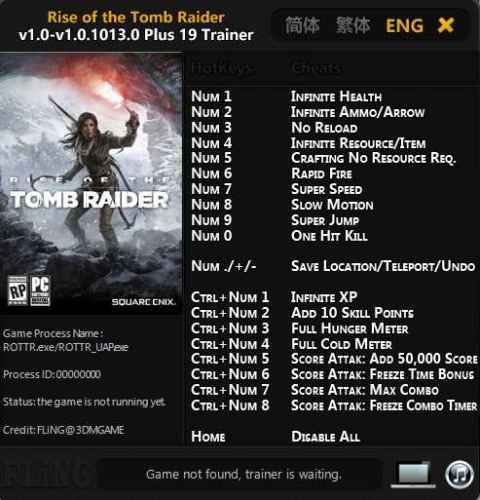
Numpad 1 - Inf. Health Numpad 2 - Inf. Ammo Numpad 3 - No Reload Numpad 4 - Inf. Items Numpad 5 - Craft No Resourses Numpad 6 - Rapid Fire Numpad 7 - Super Speed Numpad 8 - Slow Motion Numpad 9 - Super Jump Numpad 0 - One Hit Kill Num ./+/- - Save Pos./Teleport/Undo Ctrl+Num 1 - Inf. Exp. Ctrl+Num 2 - Add SP Ctrl+Num 3 - Full Hunger Meter Ctrl+Num 4 - Full Cod Meter Ctrl+Num 5 - Add Score Ctrl+Num 6 - Freeze Time Bonus Ctrl+Num 7 - Max Combo Ctrl+Num 8 - Freeze Combo Timer Home - Disable All
- 1497 Downloads
Por Ravock -
OPTIONS
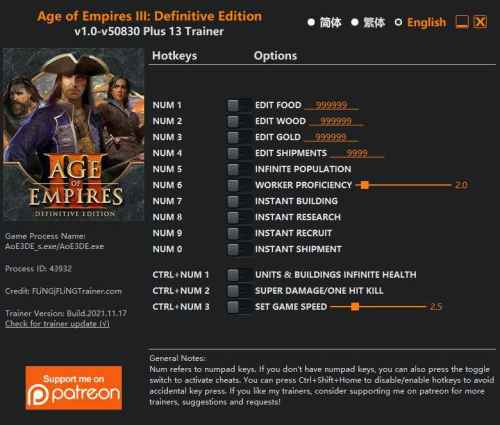
Num 1 – Edit Food Num 2 – Edit Wood Num 3 – Edit Gold Num 4 – Edit Shipments Num 5 – Infinite Population Num 6 – Worker Proficiency Num 7 – Instant Building Num 8 – Instant Research Num 9 – Instant Recruit Num 0 – Instant Shipment Ctrl+Num 1 – Units & Buildings Infinite Health Ctrl+Num 2 – Super Damage/One Hit Kill Ctrl+Num 3 – Set Game Speed NOTES
“Infinite Population” takes effect when population number changes, the population number will reset to 0, so you can recruit as many units as you want.
“Worker Proficiency” will multiply the number of resources workers gather, and their building speed, research speed, etc.
“Units & Buildings Infinite Health” takes effect when your units or buildings take damage, their health will reset to max.
- 85 Downloads
Por Ravock -
OPTIONS
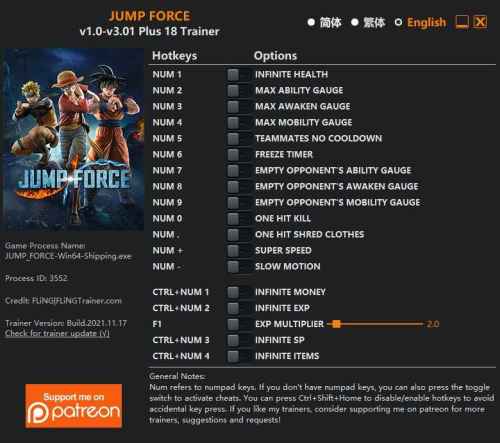
Num 1 – Infinite Health Num 2 – Max Ability Gauge Num 3 – Max Awaken Gauge Num 4 – Max Mobility Gauge Num 5 – Teammates No Cooldown Num 6 – Freeze Timer Num 7 – Empty Opponent’s Ability Gauge Num 8 – Empty Opponent’s Awaken Gauge Num 9 – Empty Opponent’s Mobility Gauge Num 0 – One Hit Kill Num . – One Hit Shred Clothes Num + – Super Speed Num – – Slow Motion Ctrl+Num 1 – Infinite Money Ctrl+Num 2 – Infinite Exp F1 – Exp Multiplier Ctrl+Num 3 – Infinite SP Ctrl+Num 4 – Infinite Items NOTES
“Infinite Health”, “Max Ability Gauge”, “Max Awaken Gauge”, “Max Mobility Gauge” take effects when their value changes (e.g. receive damage, ability gauge changes, awaken gauge changes, etc).
“Infinite Items” takes effect when you open the item menu.
“Slow Motion” only work in battle.
SPECIAL NOTES
This game uses EasyAntiCheat protection, in order to launch this game without EAC, please follow these instructions:
1. Start steam in offline mode.
2. Copy “JUMP_FORCE.exe” to game directory.
3. Start game
- 53 Downloads
Por Ravock -
OPTIONS
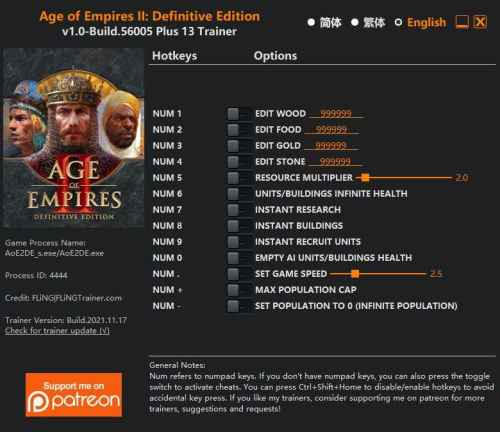
Num 1 – Edit Wood Num 2 – Edit Food Num 3 – Edit Gold Num 4 – Edit Stone Num 5 – Resource Multiplier Num 6 – Units/Buildings Infinite Health Num 7 – Instant Research Num 8 – Instant Buildings Num 9 – Instant Recruit Units Num 0 – Empty AI Units/Buildings Health Num . – Set Game Speed Num + – Max Population Cap Num – – Set Population To 0 (Infinite Population) NOTES
“Units/Buildings Infinite Health” also works on player’s animals, after using this option, you won’t be able to harvest food from your animals.
This trainer is based on Steam version, it can also target Windows Store version, but it wasn’t tested on that version, so it may or may not be 100% compatible.
“Set Population To 0 (Infinite Population)” should be used together with “Max Population Cap” otherwise you’ll still be limited by the population cap.
- 31 Downloads
Por Ravock -
OPTIONS
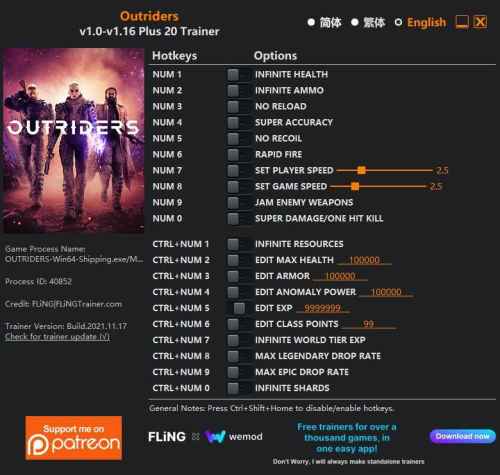
Num 1 – Infinite Health Num 2 – Infinite Ammo Num 3 – No Reload Num 4 – Super Accuracy Num 5 – No Recoil Num 6 – Rapid Fire Num 7 – Set Player Speed Num 8 – Set Game Speed Num 9 – Jam Enemy Weapons Num 0 – Super Damage/One Hit Kill Ctrl+Num 1 – Infinite Resources Ctrl+Num 2 – Edit Max Health Ctrl+Num 3 – Edit Armor Ctrl+Num 4 – Edit Anomaly Power Ctrl+Num 5 – Edit Exp Ctrl+Num 6 – Edit Class Points Ctrl+Num 7 – Infinite World Tier Exp Ctrl+Num 8 – Max Legendary Drop Rate Ctrl+Num 9 – Max Epic Drop Rate Ctrl+Num 0 – Infinite Shards NOTES
“Edit Class Points”: Takes effect when opening menu. If you activate this option while in the menu, you’ll need to close and re-open the menu in order to change class points.
“Infinite World Tier Exp”: Takes effect when killing enemies. Note you may need to finish the battle or mission in order to level up world tier.
“Infinite Resources”, “Infinite Shards”: Only works for resources & shards you already owned.
SPECIAL NOTES
This game uses EasyAntiCheat protection, in order to launch this game without EAC, please follow these instructions:
1. Copy “EAC_OUTRIDERS.exe” to game directory.
2. Start game.
- 32 Downloads
Por Ravock -
Options:
Unlimited Health Unlimited Ammo Fast Research Fast Construction Fast Recruiting Unlimited Movement Recover Troop Size Unlimited Gold
- 205 Downloads
Por Ravock -
Options:
Unlimited Health Add 100 Sunstone Add 100 Food Add 100 Stone Add 100 Wood One-Hit Kills
- 49 Downloads
Por Ravock -
Options:
Unlimited Health No Thirst No Hunger Unlimited Knowledge Points Add Accuracy Add Agility Add Encumbrance Add Grit Add Strength Add Survival Add Vitality Add Attribute Points Add 10K XP Add Level Unlimited Stamina Ghost Mode Notice:
Start the game from windows store and when asked to install battleye click cancel. Once you have a loaded a save, alt-tab and click "Play" in WeMod.
- 57 Downloads
Por Ravock -
Options:
Unlimited Health No Thirst No Hunger Unlimited Knowledge Points Add Accuracy Add Agility Add Encumbrance Add Grit Add Strength Add Survival Add Vitality Add Attribute Points Add 10K XP Add Level Unlimited Stamina Ghost Mode
- 53 Downloads
Por Ravock -
Options:
Unlimited Health Unlimited Shield Unlimited Stamina Instant Ability Cooldown Unlimited Resources No Reload Unlimited Ammo No Recoil Better Accuracy
- 66 Downloads
Por Ravock -
Options:
Unlimited Health Unlimited Morale No Thirst No Hunger No Fatigue Super Storage Capacity Super Inventory Size Citizen Age 20 Free Construction
- 35 Downloads
Por Ravock -
Options:
Infinite Fuel No Damage No Fatigue Freeze Time Add 10K Money Max Level Infinite Skillpoints Time of Day Set Time +1 Hour -1 Hour Notice:
These mods are for x64 version of the game.
- 36 Downloads
Por Ravock -
Options:
No Fatigue Unlimited Money Max Level Unlimited Skillpoints No Damage Unlimited Fuel Freeze Time
- 89 Downloads
Por Ravock -
Options:
Unlimited Health Unlimited Stamina Unlimited Resolve Unlimited Items Unlimited Tar
- 39 Downloads
Por Ravock -
Options:
Unlimited Health Unlimited Party Health Unlimited Horse Health Unlimited Food Max Morale Unlimited Smithy Stamina Unlimited Gold Unlimited Influence Unlimited Renown Unlimited XP Unlimited Shield Durability One-Hit Kills Notice:
Read notes for each mod before activating them.
Mods may take sometime to activate so be patient after activating them.
P.S: Opt out of all BETA programs for the game by right clicking on the game in Steam->Properties. Then select BETAS Tab and select "NONE - Opt out of all beta programs"
- 33 Downloads
Por Ravock -
Options:
Unlimited Health Unlimited Stamina Silent Movement Speed Boost Instant Ability Cooldown Add 100K Cash Add 1K XP Add 1 Level Add 1 Skill Point Add 1 Perk Point Add 1K Rifles XP Add 1K Handguns XP Add 1K Shotguns XP Add 1K Bows XP Unlimited Carry Weight Reset Cash Reset XP Reset Level Reset Skill Points Reset Perk Points Unlimited Ammo No Reload No Sway Freeze Animals Disable Animal Detection Add 1 Hour
- 243 Downloads
Por Ravock -
Options:
Unlimited Hull Unlimited Fuel Super Speed Add 5000 Money Add 50000 Money- 51 Downloads
Por Ravock -
Options:
Unlimited Energy Credits Unlimited Minerals Unlimited Food Unlimited Influence Unlimited Unity Unlimited Alloys Unlimited Goods Unlimited Valatile Moles Unlimited Exoticc Gases Unlimited Rare Crystals Unlimited Living Metal Unlimited Zro Unlimited Dark Matter Unlimited Nanites Unlimited Naval Capicity God Mode Fast Construction-Recruiting Fast Station Construction Fast Research Freeze Day Console/Dev Mode in Ironman- 24 Downloads
Por Ravock -
Options:
Unlimited Energy Credits Unlimited Minerals Unlimited Food Unlimited Influence Unlimited Unity Unlimited Alloys Unlimited Goods Unlimited Valatile Moles Unlimited Exoticc Gases Unlimited Rare Crystals Unlimited Living Metal Unlimited Zro Unlimited Dark Matter Unlimited Nanites Unlimited Naval Capicity God Mode Fast Construction-Recruiting Fast Station Construction Fast Research Freeze Day Console/Dev Mode in Ironman- 42 Downloads
Por Ravock -
Options:
All Needs Met Max Motivation Unlimited Money Max Character Stats Set Game Speed Notice:
Read notes for mods if they have any before using them.
- 31 Downloads
Por Ravock -
Options:
Unlimited Health Unlimited Overdrive Instant Spell Cooldown Unlimited Spell Charges Unlimited Crystals Unlimited Coins Notice:
First start game world then use mods.
- 116 Downloads
Por Ravock -
Options:
Unlimited Health Unlimited Shiny Objects Set Game Speed- 23 Downloads
Por Ravock -
Options:
Unlimited Health Unlimited Oxygen Set Game Speed- 30 Downloads
Por Ravock -
Options:
Perfect Item Condition Add 5K Money Add 1K XP Unlimited Skill Points- 29 Downloads
Por Ravock -
Options:
Unlimited Health Unlimited Stamina Easy Lock Picking Unlimited Throwables Unlimited Items Free Crafting +5K Money More Backpack Slots Max Survivor Level XP Max Agility Level XP Max Power Level XP Max Driver Level XP Max Legend Level XP Unlimited Durability Unlimited UV Flashlight Unlimited Grappling Hook No Reload Add Ammo Add Arrows Add Crossbow Bolts Super Accuracy No Recoil Weapon Cloning (Zecman) Unlimited Repairing Unlimited Fuel One-Hit Kills Zombie Carnage Switch to Day Switch to Night Freeze Timers Jump Height Teleport To Waypoint Save Location Teleport- 33 Downloads
Por Ravock
.thumb.jpeg.a332b1a55b22f4356d6644fc073fb6e5.jpeg)
.thumb.jpeg.53bb2e33e92fdfd2a7a65c9d6dcc724f.jpeg)
.thumb.jpeg.e4fc8f26825456f0d88495a40d1a283d.jpeg)
.thumb.jpeg.31d08abc8db1d86921639c0ce7cfcdbb.jpeg)

.thumb.jpeg.007d182860bdc2956fa45362d4c7fc7b.jpeg)
.thumb.jpeg.f6d20971835402c4c05f103c498c887a.jpeg)
.thumb.jpeg.026c75f67f93f17833df099dbb9c63fd.jpeg)

.thumb.jpeg.9c561a8ca740e8c658eafeb03efb8159.jpeg)
.thumb.jpeg.257fb976ae56be76f369a09e6c17c05a.jpeg)
.thumb.jpeg.337cd290dfc70293aceca1e9e9e3d3c8.jpeg)
.thumb.jpeg.eb4d408ba8b8d30e5160d826803574e2.jpeg)
.thumb.jpeg.548ebd28de8c0b3f738d5a735c0a2170.jpeg)
.thumb.jpeg.d3b82f18c517e81cf7b2eaf5d4fdfc4c.jpeg)
.thumb.jpeg.c3e37d7da179f010d24cf56c173ae34b.jpeg)
.thumb.jpeg.60ca879a227bebbe767d35d7b9b99e97.jpeg)
.thumb.jpeg.a38061d4437918f4518dc9426775a175.jpeg)

.thumb.jpeg.375d803fb0587639f40ce8bd06d3edfc.jpeg)