





Pbisnetto11
Moderador
-
Registro em
-
Última visita
Tudo que Pbisnetto11 postou
-
 Visulizar Arquivo Enshrouded Trainer (CHEATHAPPENS.COM) CHEAT DESCRIPTION: Activating this trainer If not state otherwise below, press F1 at main menu. Listen for 'Trainer Activated'. Press desired hotkey. All hotkeys can be changed on the trainer. Trainer Options # Player NumPad1: Unlimited Health NumPad2: Unlimited Stamina NumPad3: Unlimited Enshrouded Time # Enemies NumPad4: Super Damage # Progression NumPad5: 999 Skill Points # Inventory NumPad6: Move Item in Inventory Gives 99 NumPad7: Unlimited Use Quickbar Items # Items NumPad8: Infinite Item Durability # Crafting NumPad9: Easy Craft # Gameplay Multiply: Game Speed Editor Options # Player Progression Level EXP Notes The trainer is made for private / local game only. 999 Skill Points: This will temporarily give you 999 points. Autor Pbisnetto11 Enviado 08-02-2024 Categoria Trainers & Hacks Offline
 -
Visulizar Arquivo Corsairs Legacy Trainer (CHEATHAPPENS.COM) Activating this trainer If not state otherwise below, press F1 at main menu. Listen for 'Trainer Activated'. Press desired hotkey. All hotkeys can be changed on the trainer. Trainer Options # Player NumPad1: Invulnerable Player Ship NumPad2: Unlimited Ship Ammunition NumPad3: Invulnerable Character NumPad4: Unlimited Character Health NumPad5: Unlimited Stamina NumPad6: Super Damage # Game NumPad7: Game Speed Autor Pbisnetto11 Enviado 08-02-2024 Categoria Trainers & Hacks Offline
-
 Activating this trainer If not state otherwise below, press F1 at main menu. Listen for 'Trainer Activated'. Press desired hotkey. All hotkeys can be changed on the trainer. Trainer Options # Player NumPad1: Invulnerable Player Ship NumPad2: Unlimited Ship Ammunition NumPad3: Invulnerable Character NumPad4: Unlimited Character Health NumPad5: Unlimited Stamina NumPad6: Super Damage # Game NumPad7: Game Speed
 -
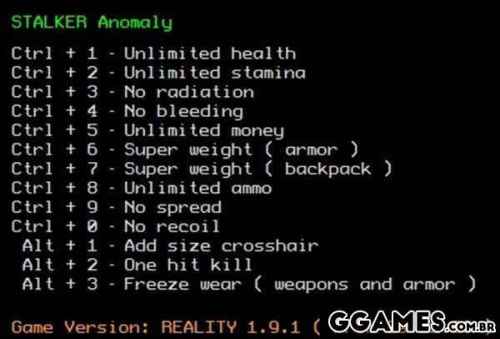 Options: Unlimited health Unlimited stamina No radiation No bleeding Unlimited ammo Unlimited money Unlimited weight No recoil No spread One hit kill No reload Freeze wear Add size crosshair
 -
Visulizar Arquivo S.T.A.L.K.E.R. Call of Pripyat Trainer (LIRW / GHL) Options: Unlimited health Unlimited stamina No radiation No bleeding Unlimited ammo Unlimited money Unlimited weight No recoil No spread One hit kill No reload Freeze wear Add size crosshair Autor Pbisnetto11 Enviado 08-02-2024 Categoria Trainers & Hacks Offline
-
Visulizar Arquivo Persona 3 Reload Trainer (CHEATHAPPENS.COM) Activating this trainer If not state otherwise below, press F1 at main menu. Listen for 'Trainer Activated'. Press desired hotkey. All hotkeys can be changed on the trainer. Trainer Options # Team Combat NumPad1: Unlimited HP NumPad2: Unlimited Mana # Enemies NumPad3: Weak Enemies # Inventory NumPad4: Unlimited Use Consumables NumPad5: Obtain All Consumable Items in Menu NumPad6: Obtain All Skill Cards # Items Needed NumPad7: Easy Open Chests # Gameplay NumPad8: Game Speed Editor Options # Resource Yen # Time and Date Month and Day value 5-371 Time value 2-9 Next Month and Day value 5-371 Next Time value 2-9 # Social Stats Academic Charm Courage # Selected Unit Stats Current HP Current SP Level EXP # Selected Unit Stats Persona Type Level EXP ST MA EN AG LU # Selected Persona Stats Type Level EXP ST MA EN AG LU Notes Save often! Doing things you aren't supposed to be able to do to this game, such as going back or forward in time could have unintended results or break scripts. Yen: Press TAB to enter MENU Month and Day value 5-371: You can rewind or do all sorts of things UNINTENDED by the game. Make sure you have SAVES before toying around with the game date and time. Academic: Press TAB to enter MENU, then STATS, then SELECT YOUR UNIT, then select SOCIAL STATS Current HP: Press TAB to enter MENU, then STATS, then SELECT the UNIT you wish to see. Type: Press TAB to enter MENU, then STATS, then SELECT the UNIT you wish to see. For YOUR player, this will show Persona 1 only. Type: Press TAB to enter MENU, then PERSONA, then select the PERSONA you wish to edit then select STATS. Autor Pbisnetto11 Enviado 08-02-2024 Categoria Trainers & Hacks Offline
-
 Activating this trainer If not state otherwise below, press F1 at main menu. Listen for 'Trainer Activated'. Press desired hotkey. All hotkeys can be changed on the trainer. Trainer Options # Team Combat NumPad1: Unlimited HP NumPad2: Unlimited Mana # Enemies NumPad3: Weak Enemies # Inventory NumPad4: Unlimited Use Consumables NumPad5: Obtain All Consumable Items in Menu NumPad6: Obtain All Skill Cards # Items Needed NumPad7: Easy Open Chests # Gameplay NumPad8: Game Speed Editor Options # Resource Yen # Time and Date Month and Day value 5-371 Time value 2-9 Next Month and Day value 5-371 Next Time value 2-9 # Social Stats Academic Charm Courage # Selected Unit Stats Current HP Current SP Level EXP # Selected Unit Stats Persona Type Level EXP ST MA EN AG LU # Selected Persona Stats Type Level EXP ST MA EN AG LU Notes Save often! Doing things you aren't supposed to be able to do to this game, such as going back or forward in time could have unintended results or break scripts. Yen: Press TAB to enter MENU Month and Day value 5-371: You can rewind or do all sorts of things UNINTENDED by the game. Make sure you have SAVES before toying around with the game date and time. Academic: Press TAB to enter MENU, then STATS, then SELECT YOUR UNIT, then select SOCIAL STATS Current HP: Press TAB to enter MENU, then STATS, then SELECT the UNIT you wish to see. Type: Press TAB to enter MENU, then STATS, then SELECT the UNIT you wish to see. For YOUR player, this will show Persona 1 only. Type: Press TAB to enter MENU, then PERSONA, then select the PERSONA you wish to edit then select STATS.
 -
 Activating this trainer If not state otherwise below, press F1 at main menu. Listen for 'Trainer Activated'. Press desired hotkey. All hotkeys can be changed on the trainer. Trainer Options # Chapters NumPad1: Unlock Chapters # Resources NumPad2: Unlimited Resources # Camp Operations NumPad3: Fast Camp Improvements NumPad4: Fast Produce Items NumPad5: Fast Rest NumPad6: Fast Rehab NumPad7: Fast Operations NumPad8: Invincible Staff NumPad9: Easy Feed Troops Multiply: Fast Graveyard # Gameplay Add: Super Game Speed
 -
Visulizar Arquivo War Hospital Trainer (CHEATHAPPENS.COM) Activating this trainer If not state otherwise below, press F1 at main menu. Listen for 'Trainer Activated'. Press desired hotkey. All hotkeys can be changed on the trainer. Trainer Options # Chapters NumPad1: Unlock Chapters # Resources NumPad2: Unlimited Resources # Camp Operations NumPad3: Fast Camp Improvements NumPad4: Fast Produce Items NumPad5: Fast Rest NumPad6: Fast Rehab NumPad7: Fast Operations NumPad8: Invincible Staff NumPad9: Easy Feed Troops Multiply: Fast Graveyard # Gameplay Add: Super Game Speed Autor Pbisnetto11 Enviado 08-02-2024 Categoria Trainers & Hacks Offline
-
 Trainer Options # Combatant Left NumPad1: Left Invincible NumPad2: Left Unlimited Heat NumPad3: Left Quick Heal NumPad4: Left Quick Lose # Combatant Right NumPad5: Right Invincible NumPad6: Right Unlimited Heat NumPad7: Right Quick Heal NumPad8: Right Quick Lose # VS CPU Matches NumPad9: Left Easy Win Battle Multiply: Right Easy Win Battle # Timer Add: Freeze Round Timer Notes RIGHT player is usually the computer or opponent in story mode. If you are playing story and it seems stuck or AI stops reacting, you may have to go to CHAPTER SELECT and select the chapter again and turn of the particular option that may be offending. Read each option instructions. As stated multiple times in the trainer options, the game is HEAVILY SCRIPTED. Parts of the game you maybe are SUPPOSED to lose, or are SUPPOSED to take damage to a certain level, or the AI isn't supposed to DIE all at once, etc. Turn off or on options if you see certain issues. Some options may not work or will work differently in the STORY mode where you are taking on many units at once. Trainer is for offline mode for STORY or against CPU. Left Invincible: Right Invincible: Invincible option prevents damage or even contact. Note that some of the game is scripted so that you MUST take damage in some instances or get damaged to a certain level. So if the game seems stuck or the opponent won't die, toggle OFF, then let them beat you down until it triggers. Left Quick Heal: Right Quick Heal: Press and the health tops off. Left Quick Lose: Right Quick Lose: WARNING! This is a powerful option. GENERALLY, the match will be over and this player will drop down dead. NOTE! If the game is scripted for the character to lose health gradually or die some other way, this may cause the game to be in a broken script, and you will have to select CHAPTER again. This is very useful for VS matches, or matches in the story where there is not much scripted story. Left Easy Win Battle: Right Easy Win Battle: Only for VS CPU and battles where you have to win 3 matches to win. This will make it so you already have 2 wins, and the next win will win the battle.
 -
Visulizar Arquivo TEKKEN 8 Trainer (CHEATHAPPENS.COM) Trainer Options # Combatant Left NumPad1: Left Invincible NumPad2: Left Unlimited Heat NumPad3: Left Quick Heal NumPad4: Left Quick Lose # Combatant Right NumPad5: Right Invincible NumPad6: Right Unlimited Heat NumPad7: Right Quick Heal NumPad8: Right Quick Lose # VS CPU Matches NumPad9: Left Easy Win Battle Multiply: Right Easy Win Battle # Timer Add: Freeze Round Timer Notes RIGHT player is usually the computer or opponent in story mode. If you are playing story and it seems stuck or AI stops reacting, you may have to go to CHAPTER SELECT and select the chapter again and turn of the particular option that may be offending. Read each option instructions. As stated multiple times in the trainer options, the game is HEAVILY SCRIPTED. Parts of the game you maybe are SUPPOSED to lose, or are SUPPOSED to take damage to a certain level, or the AI isn't supposed to DIE all at once, etc. Turn off or on options if you see certain issues. Some options may not work or will work differently in the STORY mode where you are taking on many units at once. Trainer is for offline mode for STORY or against CPU. Left Invincible: Right Invincible: Invincible option prevents damage or even contact. Note that some of the game is scripted so that you MUST take damage in some instances or get damaged to a certain level. So if the game seems stuck or the opponent won't die, toggle OFF, then let them beat you down until it triggers. Left Quick Heal: Right Quick Heal: Press and the health tops off. Left Quick Lose: Right Quick Lose: WARNING! This is a powerful option. GENERALLY, the match will be over and this player will drop down dead. NOTE! If the game is scripted for the character to lose health gradually or die some other way, this may cause the game to be in a broken script, and you will have to select CHAPTER again. This is very useful for VS matches, or matches in the story where there is not much scripted story. Left Easy Win Battle: Right Easy Win Battle: Only for VS CPU and battles where you have to win 3 matches to win. This will make it so you already have 2 wins, and the next win will win the battle. Autor Pbisnetto11 Enviado 08-02-2024 Categoria Trainers & Hacks Offline
-
Visulizar Arquivo Trainer Palworld (CHEATHAPPENS.COM) Trainer Options # Player NumPad1: Invulnerable NumPad2: Immortal Mode NumPad3: Unlimited Health NumPad4: Unlimited Pal Health NumPad5: Unlimited Stamina NumPad6: Unlimited Satiety NumPad7: Super Damage NumPad8: %100 Pal Capture Rate NumPad9: All Pals Are Lucky / Rare Multiply: No Pal Skill Cooldown Add: Unlimited Weapon Durability Subtract: No Grappling Hook Cooldown Decimal: No Reload Divide: No Recoil F1: No Hunger F2: Zero Weight F3: Unlimited Stat Points F4: Unlimited Technology Points F5: Unlock All Technology Recipes F6: Unlimited EXP F7: Free Build F8: Instant Build F9: Free Craft F10: Instant Craft F11: No Base Build Limit F12: No Frostbite F13: Unlimited Partner Ability (Lifmunk Recoil) F14: Instant Pal Breed F15: Instant Egg Hatch F16: %100 Drop Rate F17: Build Anywhere F18: Unlimited Base Buildings Health F19: Decrease Body Temperature F20: Increase Body Temperature # Time F21: Advance Time F22: Freeze Time F23: Decrease Time # Inventory F24: Refresh Inventory Editor NumLock: Prevent Ammo and Item Depletion # Key Items Scroll: Add 5 Keys to Each Key Item LeftShift: Unlimited Lifmunk Effigies RightShift: Subtract 5 Keys From Each Key Item # Player Movement LeftCtrl: Fly RightCtrl: No Clip LeftAlt: Hover Player Higher RightAlt: Hover Player Lower BrowserBack: Increase Player Speed BrowserForward: Decrease Player Speed BrowserRefresh: Set Normal Player Speed BrowserStop: Increase Jump Height BrowserSearch: Decrease Jump Height BrowserFavorites: Set Normal Jump Height BrowserHome: Decrease Gravity VolumeMute: Increase Gravity VolumeDown: Set Normal Gravity # Enemy VolumeUp: Decrease Enemy Speed MediaNextTrack: Increase Enemy Speed MediaPreviousTrack: Freeze Enemies MediaStop: Set Normal Enemy Speed # Teleport MediaPlayPause: Save Position Slot 1 LaunchMail: Save Position Slot 2 SelectMedia: Save Position Slot 3 LaunchApplication1: Save Position Slot 4 LaunchApplication2: Save Position Slot 5 Oem1: Restore Position Slot 1 OemPlus: Restore Position Slot 2 OemComma: Restore Position Slot 3 OemMinus: Restore Position Slot 4 OemPeriod: Restore Position Slot 5 # Game OemQuestion: Game Speed Editor Options # Player EXP EXP Multiplier Level Stat Points Technology Points Ancient Technology Points Money Multiplier Damage Multplier Harvest Multiplier # Inventory Slot 1 - Slot 50 # Keys Lifmunk Effigies Key Amount to Add or Remove # Player Movement Player Speed Multiplier Jump Multiplier Gravity Multiplier # Enemy Enemy Speed Multiplier Notes Immortal Mode: This option is another variation of No Hunger. Zero Weight: Enable this at main menu before loading your save game. Free Craft: Warning: Once enabled then effects are permanent in the CURRENT seesion until you restart your game. No Base Build Limit: This option allows you to build many bases as you like without a limit. Refresh Inventory Editor: Use this to refresh the inventory editor. Prevent Ammo and Item Depletion : Make sure to disable this before acquiring crafts and picking up items. Slot 1: Use 'Refresh Inventory Editor' first. Key Amount to Add or Remove: With this option you can add or remove keys from your total key items, for example if you want to add 5 to each key item then set this to 5 or if you want to remove 5 then set it to negative respectively. Autor Pbisnetto11 Enviado 08-02-2024 Categoria Trainers & Hacks Offline
-
 Trainer Options # Player NumPad1: Invulnerable NumPad2: Immortal Mode NumPad3: Unlimited Health NumPad4: Unlimited Pal Health NumPad5: Unlimited Stamina NumPad6: Unlimited Satiety NumPad7: Super Damage NumPad8: %100 Pal Capture Rate NumPad9: All Pals Are Lucky / Rare Multiply: No Pal Skill Cooldown Add: Unlimited Weapon Durability Subtract: No Grappling Hook Cooldown Decimal: No Reload Divide: No Recoil F1: No Hunger F2: Zero Weight F3: Unlimited Stat Points F4: Unlimited Technology Points F5: Unlock All Technology Recipes F6: Unlimited EXP F7: Free Build F8: Instant Build F9: Free Craft F10: Instant Craft F11: No Base Build Limit F12: No Frostbite F13: Unlimited Partner Ability (Lifmunk Recoil) F14: Instant Pal Breed F15: Instant Egg Hatch F16: %100 Drop Rate F17: Build Anywhere F18: Unlimited Base Buildings Health F19: Decrease Body Temperature F20: Increase Body Temperature # Time F21: Advance Time F22: Freeze Time F23: Decrease Time # Inventory F24: Refresh Inventory Editor NumLock: Prevent Ammo and Item Depletion # Key Items Scroll: Add 5 Keys to Each Key Item LeftShift: Unlimited Lifmunk Effigies RightShift: Subtract 5 Keys From Each Key Item # Player Movement LeftCtrl: Fly RightCtrl: No Clip LeftAlt: Hover Player Higher RightAlt: Hover Player Lower BrowserBack: Increase Player Speed BrowserForward: Decrease Player Speed BrowserRefresh: Set Normal Player Speed BrowserStop: Increase Jump Height BrowserSearch: Decrease Jump Height BrowserFavorites: Set Normal Jump Height BrowserHome: Decrease Gravity VolumeMute: Increase Gravity VolumeDown: Set Normal Gravity # Enemy VolumeUp: Decrease Enemy Speed MediaNextTrack: Increase Enemy Speed MediaPreviousTrack: Freeze Enemies MediaStop: Set Normal Enemy Speed # Teleport MediaPlayPause: Save Position Slot 1 LaunchMail: Save Position Slot 2 SelectMedia: Save Position Slot 3 LaunchApplication1: Save Position Slot 4 LaunchApplication2: Save Position Slot 5 Oem1: Restore Position Slot 1 OemPlus: Restore Position Slot 2 OemComma: Restore Position Slot 3 OemMinus: Restore Position Slot 4 OemPeriod: Restore Position Slot 5 # Game OemQuestion: Game Speed Editor Options # Player EXP EXP Multiplier Level Stat Points Technology Points Ancient Technology Points Money Multiplier Damage Multplier Harvest Multiplier # Inventory Slot 1 - Slot 50 # Keys Lifmunk Effigies Key Amount to Add or Remove # Player Movement Player Speed Multiplier Jump Multiplier Gravity Multiplier # Enemy Enemy Speed Multiplier Notes Immortal Mode: This option is another variation of No Hunger. Zero Weight: Enable this at main menu before loading your save game. Free Craft: Warning: Once enabled then effects are permanent in the CURRENT seesion until you restart your game. No Base Build Limit: This option allows you to build many bases as you like without a limit. Refresh Inventory Editor: Use this to refresh the inventory editor. Prevent Ammo and Item Depletion : Make sure to disable this before acquiring crafts and picking up items. Slot 1: Use 'Refresh Inventory Editor' first. Key Amount to Add or Remove: With this option you can add or remove keys from your total key items, for example if you want to add 5 to each key item then set this to 5 or if you want to remove 5 then set it to negative respectively.
 -
Como desativar um teclado de laptop no windows 10 Como desativar o teclado do laptop com Windows 10? É necessário deixar claro que você deve ter muito cuidado com alguns inconvenientes com os quais você pode se incorrer ao desabilitar o teclado de um laptop, alguns como podem levar a inconvenientes irreversíveis em Windows 10 pelos quais vale destacar. A instalação de um driver não suportado pode inutilizar o teclado e é melhor não tentar, pois isso pode nos levar à famosa Tela Azul da Morte, por isso antes de saber Como Author Pbisnetto11 Category Sistemas Operacionais Enviado 10-11-2022 21:06
-
Como desativar o teclado do laptop com Windows 10? É necessário deixar claro que você deve ter muito cuidado com alguns inconvenientes com os quais você pode se incorrer ao desabilitar o teclado de um laptop, alguns como podem levar a inconvenientes irreversíveis em Windows 10 pelos quais vale destacar. A instalação de um driver não suportado pode inutilizar o teclado e é melhor não tentar, pois isso pode nos levar à famosa Tela Azul da Morte, por isso antes de saber Como desabilitar o teclado de um laptop é importante Considere se realmente vale a pena fazer isso, pois pode causar outros danos desnecessários em Windows 10, de qualquer forma deixamos aqui alguns detalhes que você deve saber e são os seguintes: Existem apenas duas opções que podemos realizar e que são um tanto delicadas, mas com cuidado e fazendo tudo ao pé da letra isso pode levar a um processo viável. Desinstalar os drivers do teclado: esta é a nossa primeira recomendação para a qual é necessário saber um pouco mais sobre o assunto, e se já foi desinstalado antes, será necessário focar na desinstalação. Começamos clicando com o botão direito do mouse no Windows. Em seguida, você precisa selecionar Gerenciador de dispositivos no menu. Em seguida, prosseguimos para Expandir a seção Teclado, para a qual é apenas necessário clicar nele. Em seguida, clicamos com o botão direito do mouse para selecionar a opção Desativar dispositivo. É nosso trabalho responder afirmativamente no diálogo para confirmar e apenas aguardar a conclusão desse processo. Caso a opção Desativar não esteja disponível, é necessário prosseguir selecionando Desinstalar dispositivo de forma que saber Desativar o teclado de um laptop nos permita continuar com as instruções de remoção de drivers. Para finalizar é necessário reiniciar nosso PC e proceder para verificar se o teclado está desabilitado em Windows 10. Desabilitar a instalação automática de drivers de teclado: Este é o segundo procedimento que pode ser viável saber Como desabilitar o teclado de um laptop evitando ao máximo que Windows 10 possa instalar os drivers automaticamente onde eles possam corresponder ao ID hardware e para isso é necessário: Vá para o menu iniciar para localizar o Gerenciador de dispositivos. A seguir, é necessário expandir a seção Teclado para a qual é necessário clicar nele. Em seguida, você precisa clicar com o botão direito no nome do teclado. Prossiga para selecionar Propriedades. A seguir é necessário ir até a aba Detalhes onde clicamos em Propriedades. Em seguida, selecionamos IDs de hardware no menu suspenso. A seguir observamos 3 identificadores diferentes, de forma que procedemos à cópia do primeiro, utilizando este ID para desabilitar o teclado do laptop Windows 10. Para saber como desabilitar o teclado de um laptop é necessário utilizar as combinações de teclas de atalho do Windows R que nos permite abrir a caixa de diálogo Executar onde é necessário digitar gpedit.msc e continuar pressionando Enter. A seguir, o Editor de Política de Grupo é aberto, onde teremos que selecionar Configuração de Equipamento localizado na barra de menu do lado esquerdo. Em seguida, vamos para Modelos administrativos e, de lá, para o sistema, procuramos Instalação de dispositivo e, em seguida, Restrições de instalação de dispositivo. A seguir, examinamos a Restrição de dispositivo para clicar em Mostrar e clicar com o botão direito do mouse em Impedir instalação de dispositivo para que eles possam corresponder a qualquer ID de instância de dispositivo, procurando a opção Editar. Em seguida, selecionamos a opção Ativado e clicamos em Mostrar para colar na caixa o ID do hardware do teclado que copiamos no STEP e clicamos em OK. Vamos ao Gerenciador de Dispositivos para expandir a seção Teclado, clicamos com o botão direito do mouse em Teclado PS / 2 Padrão e continuamos com a Desinstalação. Por fim, esperamos que o processo termine, reiniciamos o nosso PC e já está. Isto é tudo que você precisa saber sobre como desabilitar o teclado de um laptop, porque na realidade é uma tarefa muito complexa com a qual você deve ter cuidado, para que seu PC não morra, por isso antes de fazer este processo em Windows 10 é melhor você pensar duas vezes.
-
Como redefinir as configurações de fábrica no windows 10 Windows 10 to Factory Settings" width="200"> Como redefinir as configurações de fábrica Windows 10? Manter os arquivos: Contaremos com a opção de manter meus arquivos para que não se percam em termos de Como restaurar as configurações de fábrica, ao final deste processo, estamos falando que o PC ficará como novo, o que faremos é reconfigurá-lo em um personalizado e para isso fazemos o seguinte: No início, vamos para a configuração e inserimos atualização Author Pbisnetto11 Category Sistemas Operacionais Enviado 10-11-2022 20:51
-
Como redefinir as configurações de fábrica Windows 10? Manter os arquivos: Contaremos com a opção de manter meus arquivos para que não se percam em termos de Como restaurar as configurações de fábrica, ao final deste processo, estamos falando que o PC ficará como novo, o que faremos é reconfigurá-lo em um personalizado e para isso fazemos o seguinte: No início, vamos para a configuração e inserimos atualização e segurança Nós escolhemos recuperação Entramos na opção iniciar na seção reiniciar PC Escolhemos salvar arquivos Aí podemos escolher a forma de reinstalação, que passa pelo download na nuvem ou reinstalação local, se for nuvem o uso do espaço é de até 4 GB para que o Windows 10 possa ser baixado em nosso PC, enquanto o local permitir que ela reinstala de si mesma Nós escolhemos a seguir e recomeçamos O que será apresentado agora é que no nosso PC está resolvido como restaurar os valores de fábrica, mantendo os arquivos que tínhamos antes deste processo, após completá-lo, devemos verificar a existência de atualizações para Windows, isso para para que não faltem coisas importantes como patches e drivers, para isso você tem que fazer o seguinte: Escolhemos começar para obter a configuração, em atualização e segurança escolhemos o Windows Update, que nos permite pesquisar se existem atualizações disponíveis, se houver, Windows 10 irá baixá-las. Com o Windows Update você também pode atualizar os drivers, para isso inserimos configuração e segurança para que ele os busque, fazendo a opção de ver atualizações opcionais Temos que escolher o driver para a atualização e fazer o download para instalá-lo Reinstalamos o que tínhamos antes da reinicialização e podemos usar o PC normalmente Apagar tudo: temos que uma das opções a ver Como restaurar as configurações de fábrica é a opção de apagar tudo, o que do nosso PC acaba eliminando nossos arquivos, aplicativos, drivers e tudo que é feito até na configuração, até as instalações do fabricante, é necessário que façamos o seguinte: No início vamos para a configuração, entrando em update e security temos a recuperação Escolhemos reiniciar o PC Nós escolhemos deletar tudo Nós escolhemos como reinstalar Windows 10, via nuvem ou localmente. Para excluir nossos arquivos e dados, você deve escolher a mudança de configuração Em seguida, damos sim para limpar os dados e confirmar Nós escolhemos o próximo Nós escolhemos reiniciar A tela de login: quanto a Como restaurar as configurações de fábrica caso ocorra o fato de não podermos acessar o Windows em nosso PC, é possível fazê-lo na tela de login fazendo o seguinte: Usamos a tecla do Windows para abrir a tela de login Ao escolher a opção de ligar, pressione a tecla Shift para que reinicie na parte inferior direita da tela Escolhemos quando a reinicialização é concluída com a solução de problemas na tela Escolhemos reiniciar este PC Nós escolhemos entre as opções de manter os arquivos, deletar tudo ou restaurar a fábrica Optamos pela restauração de fábrica, que elimina tudo e reinstala o Windows 10, passando pela exclusão de tudo para voltar ao seu estado original, caso a opção de restauração não esteja disponível, iremos excluir tudo. O novo início: esta opção consiste em podermos manter nossos arquivos no início com uma nova cópia do sistema operacional que não possui o software adicional, isto funcionará com a imagem original que a Microsoft fornece de Windows 10, então neste caso veja Como zerar os valores Da fábrica será feito o seguinte: Entramos na segurança do Windows para escolher o desempenho e o status do dispositivo Escolhemos aqui informações adicionais sobre o início recente, depois tem que escolher o próximo início para que o processo comece, no final tem que instalar as aplicações, desta forma os nossos dados pessoais são guardados quando o sistema é restaurado. Saber restaurar os valores de fábrica, pois nos permite lidar com algo tão importante quanto nosso sistema operacional com Windows 10.
-
Como consertar travamento na tela de reinicialização no windows 10 Windows 10 stuck on restarting screen" width="200"> Como corrigir travamento na tela de reinicialização em Windows 10? Para abrir o prompt de comando do Admin, temos que pressionar Windows X e depois C Aqui você tem que escrever net stop wuauserv, entrar para que o serviço de atualização não funcione em segundo plano A próxima coisa é escrever cdpor percent systemrootpor percent e com enter chegamos ao diretório de instalação do sistema operacion Author Pbisnetto11 Category Sistemas Operacionais Enviado 05-11-2022 15:16
-
Como corrigir travamento na tela de reinicialização em Windows 10? Para abrir o prompt de comando do Admin, temos que pressionar Windows X e depois C Aqui você tem que escrever net stop wuauserv, entrar para que o serviço de atualização não funcione em segundo plano A próxima coisa é escrever cdpor percent systemrootpor percent e com enter chegamos ao diretório de instalação do sistema operacional O próximo a escrever é ren SoftwareDistribution SD.old. Pressionar enter muda o nome da pasta do sistema operacional de SoftwareDistribution para SD.old, fazendo um backup, se falhar apenas indo para 😄 WINDOWSSoftwareDistribution é possível voltar ao nome original ou deletar os dados que as pastas possuem sobre a distribuição e instalação de software baixado. Para reiniciar o serviço de atualização, digite net start wuauserv para ativar as atualizações no sistema. Concluindo, saber como consertar travamento na tela de reinicialização nos permite chegar ao correto funcionamento em Windows 10, portanto devemos seguir os passos indicados neste guia.
-
Como corrigir o código de erro 0x80070490 no windows 10 O que saber sobre Windows 10? Por algum motivo existe a presença de erros no funcionamento do nosso sistema operativo, um deles que devemos conhecer é o erro 0x80070490, que ocorre por diversos motivos, onde se destaca a atualização tanto do Windows como das aplicações, agora é necessário Que sabemos como corrigir o código de erro 0x80070490 no momento em que é apresentado, vamos ver os detalhes que vêm abaixo. O que saber sobre o código de erro 0x80070490 em Windows 10? Author Pbisnetto11 Category Sistemas Operacionais Enviado 05-11-2022 14:29
-
O que saber sobre Windows 10? Por algum motivo existe a presença de erros no funcionamento do nosso sistema operativo, um deles que devemos conhecer é o erro 0x80070490, que ocorre por diversos motivos, onde se destaca a atualização tanto do Windows como das aplicações, agora é necessário Que sabemos como corrigir o código de erro 0x80070490 no momento em que é apresentado, vamos ver os detalhes que vêm abaixo. O que saber sobre o código de erro 0x80070490 em Windows 10? Entre as causas deste erro estão problemas de antivírus, sincronização e arquivos corrompidos, especificamente temos que querer atualizar o Windows para a versão mais recente que temos este código de erro, certamente omitindo-o pode ser uma opção, mas não é recomendada, apesar de aceitar aplicativos recentes em caso de atualização, existem algumas soluções que podemos aplicar para resolver Como corrigir o código de erro 0x80070490, você apenas tem que olhar atentamente o seguinte. Como corrigir o código de erro 0x80070490 em Windows 10? O antivírus: às vezes aparece uma restrição do antivírus no sistema, que pode ser a causa desse erro em Windows 10, então para ver se essa é a causa disso, o antivírus deve ser desativado para resolver Como reparar o código erro 0x80070490, basta desativá-lo e verificar se o erro persiste, se ainda existir existem outras opções a considerar. Conta local com privilégios de administrador: uma das opções a considerar em Windows 10 é a criação de uma conta à qual os privilégios de administrador devem ser atribuídos, o que nos permitirá realizar a atualização do sistema, agora fazendo isso para pesquisar veja Como reparar o código de erro 0x80070490 devemos evitar a perda de dados e para isso criamos a conta no dispositivo, atribuímos todos os privilégios, transferimos os arquivos para esta nova conta e excluímos a conta antiga e então iniciamos a sessão, então se o login for feito corretamente, poderemos tentar atualizar e ver se este código de erro ainda existe. O solucionador de problemas de atualização: desta vez temos que usar o solucionador de problemas, é uma ferramenta que traz consigo o Windows 10, que é responsável por fazer algumas correções no sistema, pode até nos ajudar em como consertar o Código de erro 0x80070490, agora para executá-los iremos na configuração do sistema para procurar a opção de atualização e segurança, ao entrar aqui você deve inserir onde está indicada a solução de problemas, chegando ao Windows Update e acessando aqui chegamos ao solucionador de problemas para executá-lo, veremos um diálogo na tela e as instruções a seguir, quando tudo isso chegar ao fim faremos um reinício do sistema, com o que possivelmente agora se é possível atualizar nosso Windows. Varredura do verificador de arquivos do sistema: neste ponto é necessário ir com as ferramentas do sistema que se mostram mais avançadas em Windows 10 para resolver uma vez Como corrigir o código de erro 0x80070490, trata-se da varredura SFC sendo necessário ter o linha de comando com privilégios de administrador, sem ela não será possível, então é necessário seguir os seguintes passos: Pressione começar Na janela, escrevemos cmd Assim que o símbolo de comando aparecer, nós damos o botão direito do mouse Nós escolhemos executar como administrador Veremos outra janela em relação ao sistema onde vamos escrever sfc / scannow Nós damos você entrar Veremos que o processo de digitalização começa e ao final os resultados são exibidos na tela, a duração desse processo é de pelo menos 20 minutos Aqui pode ser apresentada a corrupção da loja CBS entre os detalhes, o que nos levará a executar o comando na janela, esta sendo Dism / Online / Cleanup-Image / RestoreHealth, agora se o erro não aparecer não é necessário fazê-lo Encere a janela assim que o processo de limpeza for concluído Pressionamos Windows R e a janela de execução abre Aqui escrevemos services.msc e damos entrada Procuramos a opção de atualização e clicamos com o botão direito do mouse Optamos por reiniciar para o dispositivo Finalmente verificamos se podemos fazer a atualização Finalmente, agora que sabemos como corrigir o código de erro 0x80070490, é possível retornar à operação ideal oferecida por Windows 10.
-
Como excluir uma partição no windows 10 Windows 10 Very Easily" width="200"> Como deletar uma partição em Windows 10? Vá para a barra de pesquisa do Windows, aqui escrevemos PowerShell, uma vez encontrado, usamos o botão esquerdo do mouse para executá-los como administrador Escrevemos Get-Volume no PowerShell, que nos mostra as partições dos volumes Excluímos o que queremos escrevendo o comando Quitr-Partition- DriveLetter E e damos a ele enter Tendo em conta que E é a partição que p Author Pbisnetto11 Category Sistemas Operacionais Enviado 05-11-2022 14:22
-
Como deletar uma partição em Windows 10? Vá para a barra de pesquisa do Windows, aqui escrevemos PowerShell, uma vez encontrado, usamos o botão esquerdo do mouse para executá-los como administrador Escrevemos Get-Volume no PowerShell, que nos mostra as partições dos volumes Excluímos o que queremos escrevendo o comando Quitr-Partition- DriveLetter E e damos a ele enter Tendo em conta que E é a partição que pretendemos eliminar e que pode ser outra carta de identificação e procedemos à confirmação Assim terminamos nosso guia Windows 10, agora você sabe como deletar uma partição, é só aproveitá-la ao máximo.
-
Como corrigir o erro Nenhum dispositivo de saída de áudio instalado no windows 10 Windows 10 Fix [Working]" width="200"> O que saber sobre Windows 10? O funcionamento ideal do áudio passa pela necessidade de alguns controladores, só que em algumas ocasiões aparece um X vermelho no ícone do som, este é o responsável por nos avisar que está ocorrendo um erro, em relação à inexistência dispositivo de saída de áudio instalado, causando silêncio em todos os nossos dispositivos em Windows 10, agora é hora de saber Como corrigir o erro Não há dispositivo de saíd Author Pbisnetto11 Category Sistemas Operacionais Enviado 05-11-2022 14:17
-
O que saber sobre Windows 10? O funcionamento ideal do áudio passa pela necessidade de alguns controladores, só que em algumas ocasiões aparece um X vermelho no ícone do som, este é o responsável por nos avisar que está ocorrendo um erro, em relação à inexistência dispositivo de saída de áudio instalado, causando silêncio em todos os nossos dispositivos em Windows 10, agora é hora de saber Como corrigir o erro Não há dispositivo de saída de áudio instalado e é o que podemos ver no conteúdo a seguir. O que saber sobre o erro Nenhum dispositivo de saída de áudio instalado em Windows 10? Este erro pode aparecer de 2 maneiras diferentes, uma ao instalar um novo Windows no sistema ou ao usar a função de atualização do Windows, deve-se levar em consideração que o aparecimento deste erro é quando os drivers do sistema operacional estão corrompidos ou por falta de atualização, uma placa com defeito também pode ser a causa, é importante que destacamos as soluções como respostas para Como corrigir o erro Nenhum dispositivo de saída de áudio instalado no texto a seguir. Como corrigir erro Windows 10 Nenhum dispositivo de saída de áudio instalado? Atualização do driver: existe a possibilidade de que os drivers estejam corrompidos ou desatualizados, nosso primeiro passo em Como corrigir o erro Nenhum dispositivo de saída de áudio instalado é atualizar o driver em Windows 10, é oportuno que usemos alguma ferramenta como O Driver Suporte para fazer isso, pois a forma manual pode ser entediante pelo fato de Como corrigir o erro Não há dispositivo de saída de áudio instalado, desta forma podemos fazer um scan do dispositivo e os drivers ausentes serão detectados e quais Eles estão obsoletos, para isso temos que fazer o seguinte: Baixamos a ferramenta do site oficial Nós o executamos para a varredura Quando terminar, veremos os detalhes dos drivers com defeito ou desatualizados Nós pressionamos isso para consertá-lo O necessário será instalado por meio da ferramenta Conclua os processos Depois disso, reiniciamos nosso PC Usando o Gerenciador de Dispositivos: existe a possibilidade de Windows 10 não ter instalado o dispositivo de saída de áudio, então para isso temos que fazer manualmente com o suporte do gerenciador de dispositivos, onde é necessário ter detalhes que dizem respeito ao solução de placa Como corrigir o erro Nenhum dispositivo de saída de áudio instalado e consideramos as seguintes etapas: Pressionamos Windows R para abrir a janela de execução Aqui escrevemos devmgt.mcs e pressionamos enter Você tem que encontrar o controlador de som, vídeo e jogo Nós entramos em ação e optamos por adicionar hardware legado Na janela que aparece, oferecemos a você para pesquisar e instalar o hardware automaticamente e fornecemos o seguinte Procuramos na lista a opção de controlador de som, vídeo e jogo Escolhemos a placa de som de acordo com o nome, modelo e damos da seguinte forma O driver será instalado e terminaremos Agora o dispositivo de áudio que escolhemos é apresentado na janela do gerenciador de dispositivos Damos ao dispositivo com o botão direito do mouse para habilitá-lo O que faremos mais tarde é reiniciar o dispositivo, o que nos permitirá verificar se a aparência do X persiste no ícone de som de Windows 10 e teremos resolvido especificamente como corrigir o erro Não há dispositivo de saída de áudio instalado, mas se continuar a aparecer, reinstale o dispositivo que acabamos de instalar e reinicie-o. Agora que você sabe como corrigir o erro Nenhum dispositivo de saída de áudio instalado, basta aplicar as etapas e você poderá retornar à operação correta de Windows 10.
