


Líderes
-
GGames DevOps
Fundador1Pontos5972Postagens

Conteúdo Popular
Exibindo conteúdo com a maior reputação em 04/19/22 em %
-
1 ponto
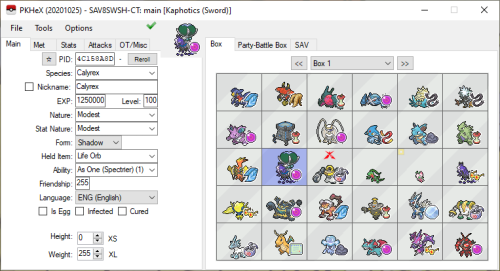 Pokémon core series save editor, programmed in C#. Supports the following files: Save files ("main", *.sav, *.dsv, *.dat, *.gci, *.bin) GameCube Memory Card files (*.raw, *.bin) containing GC Pokémon savegames. Individual Pokémon entity files (.pk*, *.ck3, *.xk3, *.pb7, *.sk2, *.bk4) Mystery Gift files (*.pgt, *.pcd, *.pgf, .wc*) including conversion to .pk* Importing GO Park entities (*.gp1) including conversion to .pb7 Importing teams from Decrypted 3DS Battle Videos Transferring from one generation to another, converting formats along the way. Data is displayed in a view which can be edited and saved. The interface can be translated with resource/external text files so that different languages can be supported. Pokémon Showdown sets and QR codes can be imported/exported to assist in sharing. PKHeX expects save files that are not encrypted with console-specific keys. Use a savedata manager to import and export savedata from the console (Checkpoint, save_manager, JKSM, or SaveDataFiler). We do not support or condone cheating at the expense of others. Do not use significantly hacked Pokémon in battle or in trades with those who are unaware hacked Pokémon are in use.1 ponto
Líderes está configurado para São Paulo/GMT-03:00