


Líderes
-
.gif.1ecb77ab2004a6ea875a6cabe4f38887.gif)
403 - Forbiddeen
Fundador2Pontos10975Postagens

Conteúdo Popular
Exibindo conteúdo com a maior reputação em 10/15/21 em %
-
1 ponto
 Os principais detalhes quanto aos componentes do seu computador são exibidos neste pequeno programa. Veja informações rápidas sobre a CPU, a memória RAM e a placa-mãe sem dificuldades. Não há nenhum segredo na utilização do CPU-Z. A interface do aplicativo é separado em abas, sendo que cada uma delas corresponde a um componente essencial do computador analisado. CPU – mostra o nome do processador, código de identificação, taxa de clock, quantia de núcleos, cache etc.; Caches – mostra o tamanho e informa uma descrição dos caches do processador (informação já obtida na guia anterior); Mainboard – modelo, chipset, southbridge, marca, versão da BIOS e outros dados sobre a placa-mãe da máquina; Memory – tipo, tamanho, quantidade de canais, frequência e outros detalhes da memória RAM; SPD – informa em quais slots os pentes de memória estão alocados; Graphics – dados sobre a placa de vídeo (on-board ou off-board) instalada na sua máquina.1 ponto
 -
1 ponto
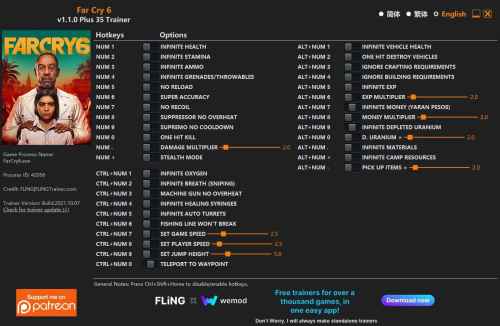 OPTIONS Num 1 – Infinite Health Num 2 – Infinite Stamina Num 3 – Infinite Ammo Num 4 – Infinite Grenades/Throwables Num 5 – No Reload Num 6 – Super Accuracy Num 7 – No Recoil Num 8 – Suppressor No Overheat Num 9 – Supremo No Cooldown Num 0 – One Hit Kill Num . – Damage Multiplier Num + – Stealth Mode Ctrl+Num 1 – Infinite Oxygen Ctrl+Num 2 – Infinite Breath (Sniping) Ctrl+Num 3 – Machine Gun No Overheat Ctrl+Num 4 – Infinite Healing Syringes Ctrl+Num 5 – Infinite Auto Turrets Ctrl+Num 6 – Fishing Line Won’t Break Ctrl+Num 7 – Set Game Speed Ctrl+Num 8 – Set Player Speed Ctrl+Num 9 – Set Jump Height Ctrl+Num 0 – Teleport To Waypoint Alt+Num 1 – Infinite Vehicle Health Alt+Num 2 – One Hit Destroy Vehicles Alt+Num 3 – Ignore Crafting Requirements Alt+Num 4 – Ignore Building Requirements Alt+Num 5 – Infinite Exp Alt+Num 6 – Exp Multiplier Alt+Num 7 – Infinite Money (Yaran Pesos) Alt+Num 8 – Money Multiplier Alt+Num 9 – Infinite Depleted Uranium Alt+Num 0 – Depleted Uranium Multiplier Alt+Num . – Infinite Materials Alt+Num + – Infinite Camp Resources Alt+Num – – Pick Up Items Multiplier NOTES “Infinite Ammo”: When activated, ammo won’t decrease when reloading. “One Hit Kill”, “Damage Multiplier”: Only works on human, note it also affects friendly NPC and civilians. “Stealth Mode”: If you’re detected before activating this option, you will need to leave the battle in order to enter stealth mode. “Infinite Money(Yaran Pesos)”, “Money Multiplier”: Takes effect when you pick up money (Yaran Pesos). “Ignore Crafting Requirements”: When activated, you can craft items even if you don’t have materials, but if you have materials, they will be used. “Infinite Grenades/Throwables”, “Infinite Healing Syringes”, “Infinite Auto Turrets”: When activated, their quantities won’t decrease. “Ignore Building Requirements”: Activate before entering building menu. When activated, you can build and upgrade buildings even if you don’t have materials, but if you have materials, they will be used. “Infinite Exp”: Takes effect when you gain exp. “Infinite Depleted Uranium”, “Depleted Uranium Multiplier”: Takes effect when you pick up depleted uranium. “Infinite Materials”: Works for resolver materials and tradables. Takes effect when you pick up resolver materials or tradables. “Infinite Camp Resources”: Takes effect when you pick up camp resources. “Pick Up Items Multiplier”: Works for resolver materials, tradables, and camp resources. Takes effect when you pick up these items. “Teleport To Waypoint”: After teleportation, you will fall from certain height, use “Infinite Health” to prevent fall damage.1 ponto
Líderes está configurado para São Paulo/GMT-03:00