


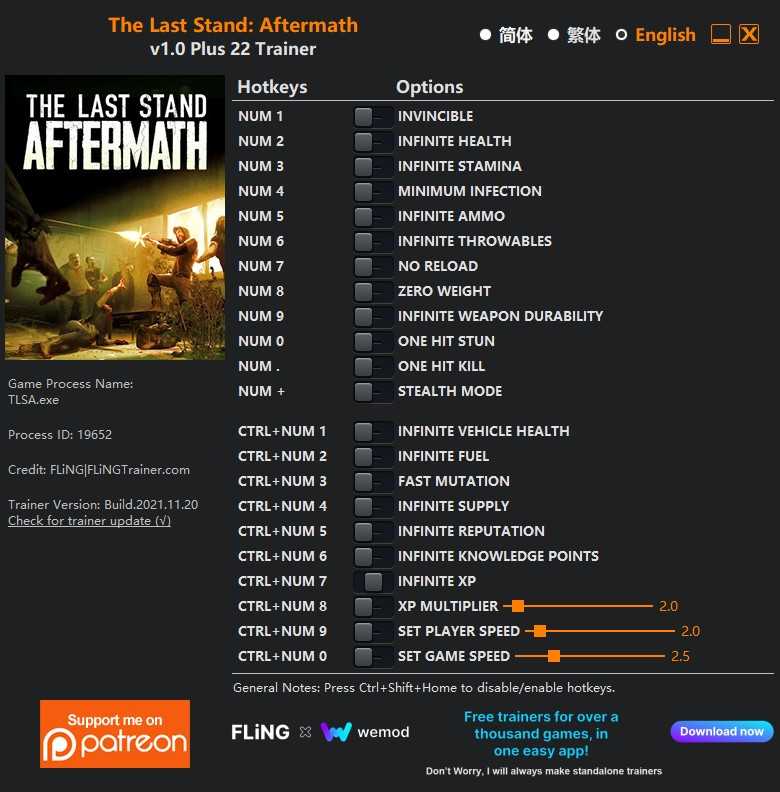
OPTIONS
- Num 1 – Invincible
- Num 2 – Infinite Health
- Num 3 – Infinite Stamina
- Num 4 – Minimum Infection
- Num 5 – Infinite Ammo
- Num 6 – Infinite Throwables
- Num 7 – No Reload
- Num 8 – Zero Weight
- Num 9 – Infinite Weapon Durability
- Num 0 – One Hit Stun
- Num . – One Hit Kill
- Num + – Stealth Mode
- Ctrl+Num 1 – Infinite Vehicle Health
- Ctrl+Num 2 – Infinite Fuel
- Ctrl+Num 3 – Fast Mutation
- Ctrl+Num 4 – Infinite Supply
- Ctrl+Num 5 – Infinite Reputation
- Ctrl+Num 6 – Infinite Knowledge Points
- Ctrl+Num 7 – Infinite XP
- Ctrl+Num 8 – XP Multiplier
- Ctrl+Num 9 – Set Player Speed
- Ctrl+Num 0 – Set Game Speed
NOTES
“Infinite Health”: Takes effect when you take damage. Your health will reset every time you take damage. Note your max health will decrease when infection increase, you can use “Minimum Infection” to prevent that.
“Minimum Infection”: Takes effect when you take damage. Your infection value will reset every time you take damage.
“Infinite Ammo”: When activated, the total ammo amount will not decrease.
“Infinite Throwables”: When activated, throwables amount will not decrease.
“Zero Weight”: Takes effect when weight updates (pick up or drop items).
“Fast Mutation”: Note your max health will decrease when you mutate, your character will die if max health drops to 0. You’ll need to disable this option before max health drops to 0.
“Infinite Supply”, “Infinite Reputation”, “Infinite Knowledge Points”: Take effects when their values update or when you go to the next map.
“Infinite XP”: Takes effect when you gain XP.
“Set Game Speed”: Note this may cause certain animations (for example, when the bridge drops) to freeze, disable this option during certain missions.

Você só pode fornecer uma análise uma vez que você tenha baixado o arquivo.
Não há análises para mostrar